Run Nemo Apps on PlasmaActive

Currently, PlasmaActive is still lacking quite a number of apps. In order to, at least temporarily, circumvent this issue, one option is to use the corresponding Nemo apps.

Usually Nemo apps are intended for smaller screen sizes like found in smartphone-class devices. Nonetheless, Nemo apps are touch UI apps. Hence, they should be usable also on other touch screen devices/OSs (like tablets running PlasmaActive) as well.

The following listing shows how to get the prerequisites for running Nemo apps on PlasmaActive.

zypper ar http://repo.pub.meego.com/CE:/Apps/CE_MW_Shared_armv7l/CE:Apps.repo
zypper ar http://repo.pub.meego.com/CE:/MW:/Shared/Mer_Core_armv7l/CE:MW:Shared.repo
zypper ar http://repo.pub.meego.com/CE:/UX:/MTF/CE_MW_MTF_armv7l/CE:UX:MTF.repo

zypper in qt-components meegotouch-theme-darko libmeegotouch libmeegotouch-l10n-en meegotouch-applauncherd meegotouch-theme

From here on you should be set to run most of the existing Nemo apps. So far I tried Q ToDo and Twimgo and both essentially run.

However, there are some issues with respect to the apps being displayed completely fullscreen. As a result the PlasmaActive status bar will be hidden. One, admittedly crude, workaround is to enter the lock-screen screen by pressing the power button and directly unlocking it again; then the status bar will re-appear.

Posted in Snippets | Tagged , , , | 1 Comment

FingerTerm on Plasma Active Update

There had been some changes in the layout of the Mer repositories some time ago. So in order to install FingerTerm now you need a different set of download repositories. Below is the updated snippet:

zypper ar http://repo.pub.meego.com/CE:/Apps/CE_MW_Shared_armv7l/CE:Apps.repo
zypper ar http://repo.pub.meego.com/CE:/MW:/Shared/Mer_Core_armv7l/CE:MW:Shared.repo

zypper in fingerterm meegotouch-applauncherd

Note that I had to reboot in order for the FingerTerm icon to show up in the “desktop” launcher. If you know a better way without reboot, please drop me note. 😉

The original post is here.


Posted in Snippets | Tagged , , , | Leave a comment

Some Panoramic Photos

Last December I started to experiment with stitching photographs to panoramic photos. In this post I publish some of the results I created over time.

All these photos were taken with either the N950 or N9. The stitching software I used was Hugin. Except this, no other “fancy” equipment was used.

The following photo shows a close-up of a river in Italy, more particular Liguria. I actually don’t know if it is a river or more like a creek. However, I think it is a good appetizer.

Continue reading

Posted in Misc. | Tagged , | 1 Comment

cljNetPcap Version 1.6.3

Already before my vacation I fixed some annoying issues in cljNetPcap. You can get cljNetPcap version 1.6.3 from its github page.

This version improves the stability, offers more robust mechanisms for extracting the shipped native libs, and improves the stability and usability of the stand alone sample implementation.

Posted in Announcements, clj-net-pcap, Libs. | Tagged , , | Leave a comment

N9 Touchstone Mod

Before going on, the usual disclaimer apply. Doing the things described or shown here you will for sure void your device warranty. Furthermore, you really risk breaking your device or causing other, possibly serious, damage to you, your surroundings etc. Having said that we can go on.

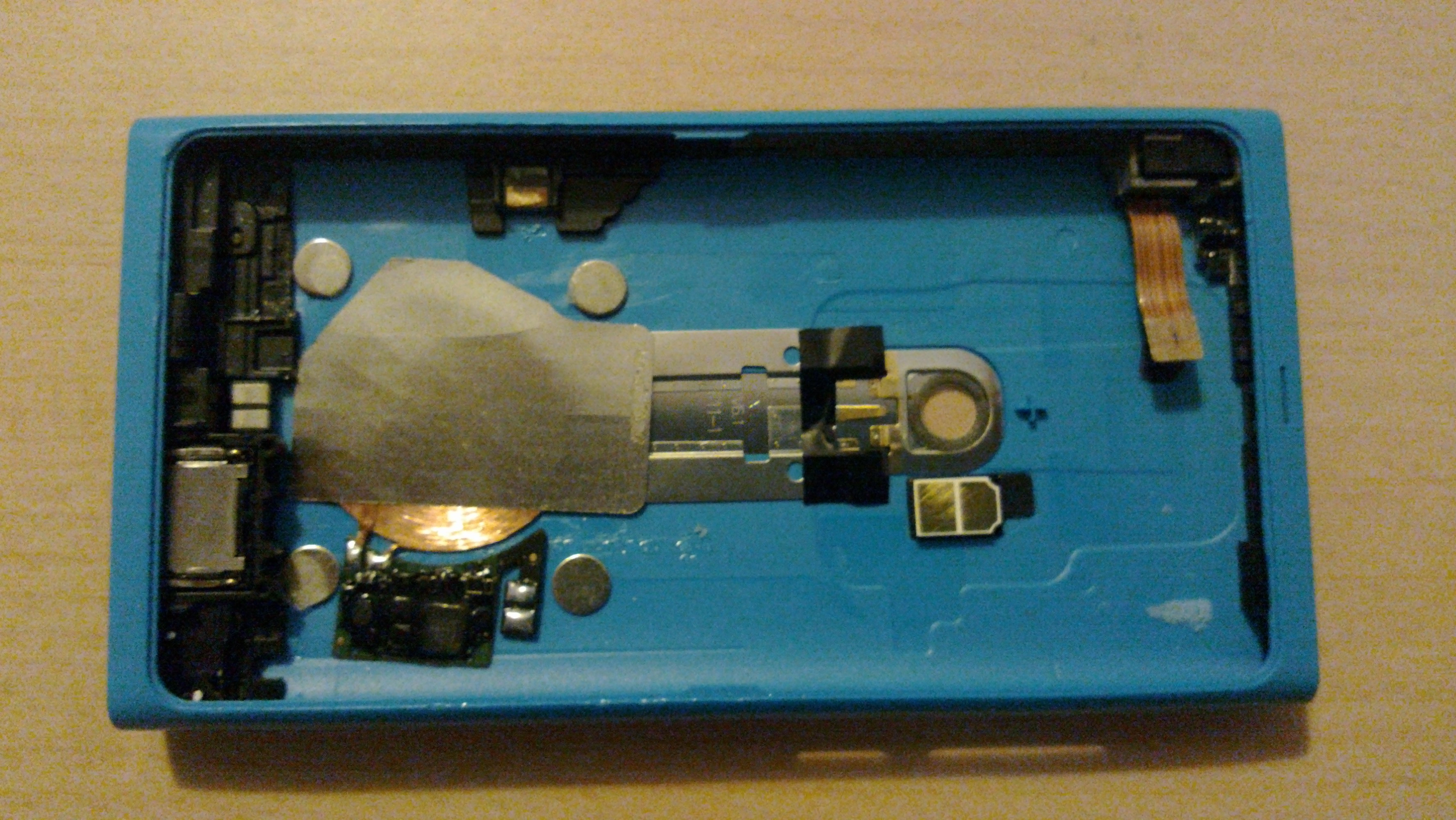
I did this quite some time ago but actually didn’t happen to find the moment to write the blog post. Similarly to the N900 Powermat Mod, I modded my N9 for wireless charging. This time I used the Palm Touchstone wireless charging kit.

On the first glance the N9 seems to be much more compact and higher integrated than the N900. However, as it turned out there is still enough space in there to fit in the required parts for wireless charging. I posted the details of this mod on talk.maemo.org.

In this post I show the full resolution photos I took as examples for the above blog post. Hopefully, they will be useful for someone.


Posted in Misc. | Tagged , | Leave a comment

Recursive Update Script for SVN, Git, etc.

I am working with a bigger number of different version control systems. I use these from different locations, so I have the use-case of frequently updating those repositories.

The following script recursively traverses a directory structure; once it finds a repository of a “known”version control system it updates that repository and continues to go on in the directory structure. Additionally, it colors the output depending on the result. Furthermore, it is possible to skip certain directories by placing a file named “.skip” in a respective directory.

#!/bin/sh
#
# Copyright 2012, Ruediger Gad <r.c.g@gmx.de>
#
# This work is licensed under the Creative Commons Attribution-ShareAlike 3.0 Unported License.
# To view a copy of this license, visit http://creativecommons.org/licenses/by-sa/3.0/
# or send a letter to Creative Commons, 444 Castro Street, Suite 900, Mountain View, California, 94041, USA.
#
# Usage:
# Update all repositories from the current path on: update_repositories.sh
# Update all repositories within a given path: update_repositories.sh <PATH>
#

if [ $# -eq 0 ]
then
  START_DIR="$(pwd)"
else
  START_DIR="$1"
fi

function colorize_output(){
  OUTPUT=$("$@")
  if [ $? -eq 0 ]
  then
    echo -e "\E[42m$OUTPUT\E[0m" 
  else
    echo -e "\E[41m$OUTPUT\E[0m" 
  fi
}

function process_directory(){
  for i in "$1"/*
  do
    if [ -d "$i" ]
    then
      echo "Processing \"$i\"..."
      if [ -e "$i"/.skip ]
      then
        echo -e "\E[43mSkipping \"$i\"...\E[0m"
      elif [ -d "$i"/.svn ]
      then
        cd "$i"
        colorize_output svn up
        cd -  &> /dev/null
      elif [ -d "$i"/.git ]
      then
        cd "$i"
        colorize_output git pull
        cd - &> /dev/null
      elif [ -s "$i"/.osc ]
      then
        cd "$i"
        colorize_output osc up
        cd - &> /dev/null
      else
        process_directory "$i"
      fi
    fi
  done
}

process_directory "$START_DIR"

Posted in Snippets | Tagged | 1 Comment

QZeeControl for Mer/Nemo

Today, I also packaged QZeeControl for Mer/Nemo. You can get it from my download repository.

However, please keep in mind that this is still very experimental. It also seems that Bluetooth support is not very mature in Mer/Nemo yet. In fact, today, after an update to the latest versions, was the first time when I noticed that Bluetooth is actually working in Mer/Nemo.

Posted in Announcements, My Applications, QZeeControl | Tagged , , , , | Leave a comment

VUMeter for Mer/Nemo

Just packaged the QML version of VUMeter for Mer/Nemo. You can get it from my download repository.

Posted in Announcements, My Applications, VUMeter | Tagged , , , , | Leave a comment

FingerTerm on Plasma Active

Actually, I really like Plasma Active/Mer on my Archos G9 tablet. Though, I wasn’t too happy with the combination of the standard terminal app and the on-screen keyboard when using Plasma Active/Mer on my Archos G9. Issues that bugged me were primarily missing keys like ESC, CTRL, or the arrow keys. Without these a terminal and especially vi(m) is not really usable. However, for Harmattan and Nemo there is already a great terminal replacement called Finger Term.

While Finger Term is not officially available for Plasma Active it can be easily installed. In order to install Finger Term first the relevant repositories need to be added, then Finger Term needs to be installed, and, finally, at the time of writing, a missing dependency needs to be installed.

The following listing shows the commands to do this. Note that these need to be run as root.

zypper ar http://repo.pub.meego.com/CE:/Apps:/MTF/CE_MW_MTF_armv7l/CE:Apps:MTF.repo
zypper ar http://repo.pub.meego.com/CE:/MW:/MTF/CE_MW_Shared_armv7l/CE:MW:MTF.repo

zypper in fingerterm
zypper in meegotouch-applauncherd

That’s it; now you can use Finger Term on your Plasma Active powered Tablet PC as well. In my opinion, this way it is much easier to hack on the device itself. 🙂

Posted in Snippets | Tagged , , , | 1 Comment

QML Duck-typing Example

When one wants to achieve dynamic behavior in object-oriented languages like C++ or Java one approach is to leverage inheritance; e.g., one could define a base class or an interface that defines a method, say “foo()”, that must be implemented by derived classes. Classes derived from that base class or implementing that interface need to provide an implementation for that “foo()” method. So, by this mechanism the “foo()” method can be called on all objects (instances) of classes deriving/implementing the base class/interface in question. Thereby, the actual implementation can vary arbitrarily.

In QML there is no need for such an inheritance-based approach; QML supports what is also referred to as “duck-typing”. In a nutshell, duck-typing is a way to resolve and call methods independently of type information. The only important thing is that, when calling a method, an actual method implementation exists, else an error will occur.

The term “duck-typing” originates from a quote that is attributed to James Whitcomb Riley: “When I see a bird that walks like a duck and swims like a duck and quacks like a duck, I call that bird a duck.”. In the context of a programming language it can be roughly interpreted as: if I see an object (no matter of what type) with the method I want to call, I call that method.

In order to demonstrate this in action I created a simple stand-alone example. You can get the source code of this example on github. Following is a screenshot of what it looks like.
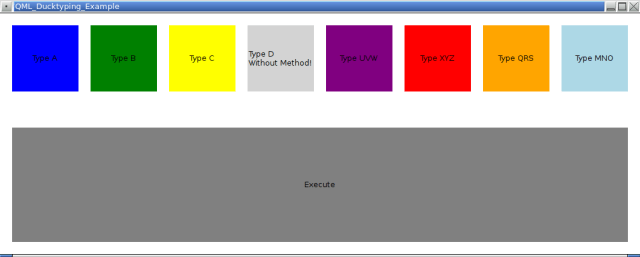
What this example does is fairly simple: the buttons at the top allow to dynamically create objects of different types. By pressing the “Execute” button it is attempted to execute/call a method “myMethod()” on the resulting object.

The first types resemble a classic C++ class hierarchy with base class A and B and C being derived from A. In A “myMethod” is declared as virtual and that is overwritten by B and C respectively.

D is a stand-alone class that does not provide an implementation of “myMethod()”. This demonstrates that errors will occur when it is attempted to call a method on an object (a class instance) for which no corresponding method implementation exists.

UVW is another stand-alone class but this time it provides a “myMethod()” method. This demonstrates that duck-typing generally works. We do not rely on any type information, just the fact that a “myMethod()” implementation exists.

Similarly, XYZ is yet another stand-alone class with a “myMethod()” method. However, this time “myMethod()” also returns an integer value. The value depends on the internal state of a XZY object and is incremented at each call. This demonstrates that by leveraging duck-typing in QML methods may or may not return values.

Types QRS and MNO are similar to UVW and XYZ except that these are implemented in QML insteadd of C++/Qt. This demonstrates that the duck-typing capabilities are not limited to classes created in C++/Qt.

Not shown in this example is dynamic object creation in C++/Qt; all objects are dynamically created in QML.

I wrote this example as reply to a question by Marcin.

Posted in Qt/QML, Snippets | Tagged , | 2 Comments