Archos G9 and UMTS via Archos 3G USB Stick on Plasma Active Update

Earlier, I wrote about how to use UMTS with the Archos 3G USB UMTS stick in Plasma Active on Archos G9 [1][2][3]. There I introduced a number of custom stuff like changed kernel config, additional tools (usb-modeswitch), or additional configuration (like udev rules). This required quite some manual work in order to get everything in place.

Fortunately, in the meantime, this had been integrated into the testing images of Plasma Active. So you get very much of the requirements out of the box when you install a fresh Plasma Active testing image. Great thanks to mdfe for merging this into the official testing repository. 😀

You still need to set up a network manager configuration for the WWAN connection. Additionally, you might need to disable the PIN of the SIM card; I had some issues that I could solve (or at least circumvent) by disabling the PIN. For information on how this can be done please see my other, older posts about this. There you also find some information on how to debug the WWAN connection.

Note that I sometimes need to connect twice in order to get the connection working (i.e., the first attempt fails and the second succeeds). For now, I don’t know if this is due to bad reception or some configuration issue. But this is nothing I consider a major issue right now.

Posted in Snippets | Tagged , , , | Leave a comment

nemo-compatibility 0.1.0 – Easily use Nemo Apps on Plasma Active

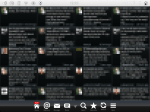
In several previous posts I wrote about using Nemo apps on Plasma Active. Personally, I think this is pretty cool because you get a lot more nice applications for your Plasma Active tablet for free. Many Nemo applications are very well usable also on the bigger screen of a tablet. I posted screenshots of Nemo apps running on Plasma Active here and here.

In order to ease the installation of Nemo apps on Plasma Active (but possibly also on other systems) I created a special repository and a meta-package that helps you to install the needed packages. I called this package “nemo-compatibility”. The installation should be straight forward and happens in four steps. Note that all this needs to be run as root user.

Firstly, you need to add my nemo-compatibility download repository. Below is an example how this is done for Plasma Active on Archos G9 or other armv7l tablets, but nemo-compatibility is also available for other architectures.

# Add the nemo-compatibility repository (example for Archos G9 and other armv7l systems).
zypper ar -G http://repo.pub.meego.com/home:/wonko:/nemo-compatibility/CE_UX_PlasmaActive_armv7l/home:wonko:nemo-compatibility.repo

Next, you need to install the nemo-compatibility package as shown below.

# Install nemo-compatibility.
zypper in nemo-compatibility

After the installation has finished you need to run a script. You should have gotten a hint to run this script also during the installation. This script will add the required repositories and install required packages. This is shown in the next listing.

# Run post installation script.
nemo-compatibility.sh install

After this has been run you might need to restart Xorg or your tablet. You should have gotten an according notification when you ran that script. The simplest way is to restart Xorg as shown below.

# Restart Xorg.
killall Xorg
# Xorg will automatically restart. Give it a little time.

That’s it. Now you can install Nemo apps like TwimGo, puzzle-master, or Q ToDo as shown below.

# Install Nemo apps.
zypper in com.substanceofcode.twimgo puzzle-master qtodo

There is one caveat right now. For some reasons the icons for newly installed applications do not show up directly after the installation. To fix this you can restart the tablet. The icons should be there after the reboot. However, to test the newly installed apps you can as well start these via a terminal. I will be looking into how this can be fixed later. For now I am very happy that this, in general, works reasonably well to be used in daily usage.

Update: the problem that the icons were not updating properly was a bug in Plasma Active that had been fixed in the meantime. So, the most recent testing versions should not exhibit this issue. Thanks a lot to Aaron Seigo (aka aseigo) for the quick fix. 🙂

Your feedback and questions are highly appreciated. I hope you enjoy using Nemo apps on Plasma Active as much as I do. 🙂

Posted in Announcements, Snippets | Tagged , , , , | Leave a comment

Nemo Apps on Plasma Active Update

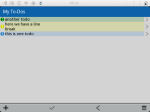
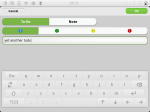
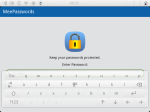
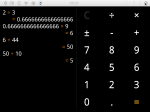
I made some more progress on getting Nemo applications to run on Plasma Active. While some apps were already running quite well, other apps (like my own Q To-Do or MeePasswords) still had some issues.

With the latest version of my hacks these issues seem to be solved as well. Now, much more Nemo apps run very well on Plasma Active.

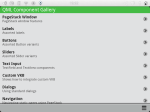
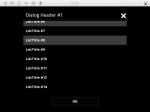
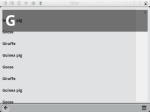
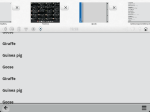
Below are some screenshots of what it looks right now.

Posted in Snippets | Tagged , , , | 2 Comments

Plasma Active Custom Keyboard

I am using Plasma Active more and more. Recently, even Plasma Active 3 had been officially released/announced.

While Plasma Active is really usable I was pretty unlucky about the virtual keyboard. For “normal” use it should be very good. However, I also like to hack “on-device”. For this I need tab-completion in the shell, arrow keys to navigate in the shell, or the escape-key in order to use vim.

Hence, I created my own custom keyboard layout. Actually, I changed the default layout in order to meet my needs. While I was at it I also added more keys, changed the layout a little bit more, made the keyboard transparent, and increased the space between the virtual keyboard and the edge of the screen.

The transparency is no eye-candy. Personally, I think transparency is indeed very helpful as this way it is possible to see the things,  e.g., text in a terminal, beneath the keyboard.

The increased spacing between the keyboard and the screen helps, at least me, to use the keyboard. When the keyboard is too close to the edge of the screen I had some problems using the keys near the screen edge as the touch events seemed not to be very precise in that region.

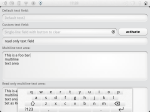
Below is a screenshot of the keyboard in action.

If you want to use this keyboard, you can get it from one of my repositories. The listing below shows how this is done.

zypper ar http://repo.pub.meego.com/home:/wonko:/branches:/Project:/KDE:/Trunk:/Testing/CE_UX_PlasmaActive_armv7l/home:wonko:branches:Project:KDE:Trunk:Testing.repo
zypper up maliit-active libmaliit-quick
killall -9 maliit-server

Note that you need to update maliit-active and libmaliit-quick. In order to directly use the new keyboard you need to restart maliit-server. This can be done simply by killing it, it will be restarted automatically.

Posted in Snippets | Tagged , , , | 3 Comments

Archos 3G Stick Detection Patch

Yesterday, I posted how I got the Archos 3G USB stick working in Plasma Active on my Archos G9. Today, I came up with an admittedly  pretty crude hack to significantly improve the handling of the USB stick.

This hack does two things. Firstly, now the 3G stick is always correctly recognized whereas before there was still the chance that the stick was not correctly recognized. Secondly, this patch significantly speeds up the detection of the stick; now it takes about one to two seconds until the WWAN connection can be used compared to 20 to 30 seconds without the hack.

The hack is for modem-manager and is actually very simple. However, it changes modem-manager such that it cannot be used with pretty much any other WWAN stick than the Archos 3G. So if you intend to use a different USB stick you probably shouldn’t use that hack.

This hack is just a very quick and even more dirty try on speeding things up. Still, it works actually very good so far. In the following the patch is shown:

diff --git a/src/mm-plugin-base.c b/src/mm-plugin-base.c
index 8cee38d..c01a045 100644
--- a/src/mm-plugin-base.c
+++ b/src/mm-plugin-base.c
@@ -897,6 +897,10 @@ _internal_probe_port (MMPluginBase *self,
name = g_udev_device_get_name (port);
g_assert (name);

+    if(strcmp(name, "ttyUSB4") != 0){
+        return FALSE;
+    }
+
serial = mm_at_serial_port_new (name, MM_PORT_TYPE_PRIMARY);
if (serial == NULL) {
g_set_error_literal (error, MM_MODEM_ERROR, MM_MODEM_ERROR_GENERAL,

You can get a compiled version of modem-manager that includes this hack from my repository.

Posted in Snippets | Tagged , , , | 1 Comment

Addendum: UMTS + Archos G9 + Plasma Active

Yesterday I wrote a somewhat longer post on how to use the Archos 3G USB stick with an Archos G9 and Plasma Active. What I forgot to mention is that, even though it generally works, there are still some, for now, possibly random issues.

The cause of the problem is that the Archos 3G stick has two device nodes (/dev/ttyUSB3 and /dev/ttyUSB4) that are detected as WWAN interfaces. That a WWAN or UMTS stick is detected as two devices showing up as WWAN interfaces does, usually, not seem to be an issue. Ususally, it seems that one is treated as primary and the other as secondary device.

However, there is the problem that modem-manager sometimes swaps the order in which the primary and secondary device are assigned. The correct order for UMTS to work correctly is that /dev/ttyUSB4 is the primary and /dev/ttyUSB3 the secondary device.

This can be easily checked with the modem-manager debug output:

...
modem-manager[3794]:  [1349557760.261848] [mm-modem-base.c:155] mm_modem_base_add_port(): (ttyUSB4) type primary claimed by /sys/devices/pci0000:00/0000:00:1d.7/usb1/1-7
...
modem-manager[3794]:  [1349557760.266845] [mm-modem-base.c:155] mm_modem_base_add_port(): (ttyUSB3) type secondary claimed by /sys/devices/pci0000:00/0000:00:1d.7/usb1/1-7
...

In the above listing the correct order is shown. Once the 3G stick had been detected it might take up to, say, 20 seconds until it is recognized by NetworkManager. Once it is recognized the debug output of NetworkManager looks like something as follows:

NetworkManager[3627]:  (ttyUSB4): failed to look up interface index
NetworkManager[3627]:  (ttyUSB4): new GSM/UMTS device (driver: 'generic' ifindex: 0)
NetworkManager[3627]:  (ttyUSB4): exported as /org/freedesktop/NetworkManager/Devices/2
NetworkManager[3627]:  (ttyUSB4): now managed
NetworkManager[3627]:  (ttyUSB4): device state change: unmanaged -> unavailable (reason 'managed') [10 20 2]
NetworkManager[3627]:  (ttyUSB4): deactivating device (reason 'managed') [2]

If the order of ttyUSB3 and ttyUSB4 is swapped then here ttyUSB3 would appear. In this case the device will still show up in the network management applet but the connection setup will fail. If this happens the output of NetworkManager will be something like shown in the following listing:

...
NetworkManager[3260]: <info> Activation (ttyUSB3) Stage 3 of 5 (IP Configure Start) started...
NetworkManager[3260]: <info> (ttyUSB3): device state change: config -> ip-config (reason 'none') [50 70 0]
NetworkManager[3260]: <info> starting PPP connection
NetworkManager[3260]: <info> pppd started with pid 3945
NetworkManager[3260]: <info> Activation (ttyUSB3) Stage 4 of 5 (IPv6 Configure Timeout) scheduled...
NetworkManager[3260]: <info> Activation (ttyUSB3) Stage 3 of 5 (IP Configure Start) complete.
NetworkManager[3260]: <info> Activation (ttyUSB3) Stage 4 of 5 (IPv6 Configure Timeout) started...
NetworkManager[3260]: <info> Activation (ttyUSB3) Stage 4 of 5 (IPv6 Configure Timeout) complete.
Plugin /usr/lib64/pppd/2.4.5/nm-pppd-plugin.so loaded.
** Message: nm-ppp-plugin: (plugin_init): initializing
** Message: nm-ppp-plugin: (nm_phasechange): status 3 / phase 'serial connection'
Removed stale lock on ttyUSB3 (pid 3818)
using channel 7
Using interface ppp0
Connect: ppp0 <--> /dev/ttyUSB3
** Message: nm-ppp-plugin: (nm_phasechange): status 5 / phase 'establish'
sent [LCP ConfReq id=0x1 <asyncmap 0x0> <magic 0x6c227513> <pcomp> <accomp>]
NetworkManager[3260]: <warn> /sys/devices/virtual/net/ppp0: couldn't determine device driver; ignoring...
sent [LCP ConfReq id=0x1 <asyncmap 0x0> <magic 0x6c227513> <pcomp> <accomp>]
NetworkManager[3260]: <warn> pppd timed out or didn't initialize our dbus module
NetworkManager[3260]: <info> Activation (ttyUSB3) Stage 4 of 5 (IPv4 Configure Timeout) scheduled...
Terminating on signal 15
NetworkManager[3260]: <info> Activation (ttyUSB3) Stage 4 of 5 (IPv4 Configure Timeout) started...
NetworkManager[3260]: <info> (ttyUSB3): device state change: ip-config -> failed (reason 'ip-config-unavailable') [70 120 5]** Message: nm-ppp-plugin: (nm_phasechange): status 10 / phase 'terminate'
...

Note the repetition of the lines starting with "sent" shown here. It seems like that in the case of ttyUSB3 being the primary device pppd somehow does not get a response from the provider side.

For now, I couldn’t identify the reason why the two ttyUSB devices are swapped or not. However, all this shows, that, generally, WWAN is possible on Archos G9 with Plasma Active.

The problem sketched above only occurred pretty seldom during my tests here. It usually occurred sometimes when I woke my tablet up from sleep. In this case suspending the tablet and waking it up again was sufficient to solve this issue.
Posted in Snippets | Tagged , , , | 1 Comment

Enabling UMTS on Archos G9 in Plasma Active

Finally, I’ve had some success in making UMTS on Archos G9 in Plasma Active work. In this post I describe the steps I did for, at first manually, enabling UMTS, how to automate this, and some useful techniques for debugging WWAN.

The hardware I use is a Archos G9 tablet and the Archos 3G UMTS stick. This stick plugs into a standard USB port of the tablet and  integrates seamlessly with the case of the Archos G9 series.

Continue reading

Posted in Snippets | Tagged , , , | 5 Comments

Screenshots: Nemo Apps on Plasma Active

Upon request here are some screenshots of some Nemo apps running in Plasma Active:

As you can see very much already works.

The patches/hacks I made, essentially, force full screen apps to run in “normal” mode instead of full screen and take care of sizing the app content correctly as shown in the screenshots. Without these patches full screen apps would cover the top bar and the app content would not scale correctly in some cases. Additionally, there had been some issue with the keyboard, which caused in some cases that the keyboard background was painted black instead of showing the app in the background.

There is also still room for improvement: e.g., apps forced to portrait mode are displayed sideways and in some cases the keyboard has slight issues like (in rare cases) still overpainting an app or that (also in only few cases) the update of the text field is not shown in “real time” but happens only after the keyboard had been closed.

Posted in Snippets | Tagged , , , | 1 Comment

Nemo Apps on Plasma Active: Improved Look and Feel

In the previous posts I described how to install Nemo apps on Plasma Active. However, there were still some issues that heavily impacted the usability.

E.g., many Nemo apps (like TwimGo) start in full screen mode by default. This is a problem because QML apps running in full screen cover the “top bar” in plasma active that provides access to window and application management plus control functionality.  Thus, with QML apps being full screen covering the top bar it is not possible to conveniently use Nemo apps within Plasma Active.

To solve this issue I “patched” three packages. Actually these “patches” are very nasty hacks, but so far they prove to work as intended.

Overall, I modified the following packages: libqtgui4, libqtdeclarative4, and qt-components. You can get these hacked versions from my QtHack repository:

zypper ar http://repo.pub.meego.com/home:/wonko:/QtHack/Mer_Core_armv7l/home:wonko:QtHack.repo

After you added this repository you can update the relevant packages as follows in order to install the “hacked” versions:

zypper update libqtgui4 libqtdeclarative4 qt-components

The result should be that all Nemo applications integrate much better with Plasma Active now. Nemo apps should not run in full screen mode anymore. Furthermore, the on screen keyboard should in many cases not cover the displayed QML app with a black background.

Issues that are not solved right now are that the screen orientation is not currently taken care of correctly. Also, the on-screen keyboard may still hide the underlying QML app in some cases. Additionally, the way the patches are currently implemented requires changes and recompile of different packages. It would be better if there was a possibility to encapsulate these hacks in much smaller deployment units (aka packages).

The following patch is for Qt in order to disable the full screen mode of the QDeclarativeView: https://build.pub.meego.com/package/view_file?file=qdeclarativeview-non-fullscreen-hack.patch&package=qt&project=home%3Awonko%3AQtHack&rev=7ce5094bab71ab8dc841e4cc5eb91ce1

This patch fixes some issues in the according QML files that impact both the full screen as well as the keyboard issue: https://build.pub.meego.com/package/view_file?file=nemo-qml-apps-for-plasma-active-hack.patch&package=qt-components&project=home%3Awonko%3AQtHack&rev=8dac6618ba1d593329d780e32bbc9508

I made these patches very quickly and used quite some brute-force there. 😉 .However, personally, I am very happy with the results. This way, Plasma Active can make use of a multitude of existing Nemo apps. Including great apps like TwimGo or Kasvopus (but also my own apps like MeePasswords or Q-To-Do), and these Nemo apps integrate much better with Plasma Active than when using a “plain” Plasma Active install.

Posted in Snippets | Tagged , , , | Leave a comment

Nemo Apps on Plasma Active

In this post I showed the basic steps on how to enable the general possibility for running Nemo Apps on Plasma Active. With this preparation it is, e.g., possible to run the Nemo version of Q To-Do or MeePasswords on Plasma Active.

Essentially, one can install any Nemo App via the built-in package manager this way. The following example shows how to install Q To-Do and MeePasswords (given that you already prepared your Plasma Active installation as described in the post mentioned above):

zypper in qtodo
zypper in meepasswords

While it is generally possibly to install all Nemo apps, some need a little bit of additional manual work to run. One such app is, e.g., TwimGo. Like Q To-Do or MeePasswords TwimGo can be installed as follows:

zypper in com.substanceofcode.twimgo

However, you will notice that it will not run right away. You can debug the issue by running it from the command line. Below is the output of an attempt to run TwimGo in a remote shell via SSH (Note to run this as “mer” user. When in doubt do a “su – mer” before running this.):

[mer@localhost ~]$ DISPLAY=:0 /opt/com.substanceofcode.twimgo/bin/TwimGo
Adding Master Pointer: Virtual core pointer ( 2 )
Skipping non-Touch device: Virtual core XTEST pointer ( 4 )
Adding ATTACHED touch device: ARCHOS-TWL6040 Headset Jack ( 8 )
Adding ATTACHED touch device: MMA8453Q Accelerometer ( 9 )
Adding ATTACHED touch device: compass ( 10 )
Adding ATTACHED touch device: tr16c0_i2c_tsp ( 11 )
file:///opt/com.substanceofcode.twimgo/qml/TwimGo/main.qml:21:1: module "QtMobility.location" is not installed
import QtMobility.location 1.1

As can be seen in the output it is missing QtMobility.location. This missing module can be easily installed.

Firstly, we need to figure out which package we need. We can do this as follows:

[root@localhost ~]# zypper search location
Loading repository data...
Reading installed packages...

S | Name                               | Summary                                                            | Type
--+------------------------------------+--------------------------------------------------------------------+--------
| contextkit-meego-location-geoclue  | Geoclue location plugin for Contextkit                             | package
| contextkit-meego-location-skyhook  | Skyhook location plugin for Contextkit                             | package
| contextkit-plugin-location-gypsy   | Location ContextKit plugin using org.freedesktop.Gypsy             | package
| contextkit-plugin-location-skyhook | Location ContextKit plugin using com.skyhookwireless.wps interface | package
| libdeclarative-location            | Qt Mobility Location QML plugin                                    | package
i | libqtlocation1                     | Qt Mobility Location module                                        | package

As we can see we already have libqtlocation1 installed but are missing the corresponding QML module. We can install the missing module as follows (as “root” user):

zypper in libdeclarative-location

That’s it. Now you can run TwimGo. Furthermore, you now know the general way of how to install Nemo apps and how to debug issues with apps that require additional packages.

Posted in Snippets | Tagged , , , | Leave a comment