cli4clj 1.1.0 Released

This is a brief post to announce the release of cli4clj, a small library for easing the creation of interactive command line interfaces (CLIs), version 1.1.0. The most noteworthy changes in version 1.1.0 are:

  • Updated dependencies
  • Moved the testing helper functions from cli4clj.cli to cli4clj.cli-tests.

I did the latter change in order to improve the organization of the code and to make it easier for users to identify which functions/macros are useful for which purpose. However, if you are already using the testing helper functionality, you need to change the imported namespace from cli4clj.cli to cli4clj.cli-tests.

As usual, constructive criticism, comments, and feedback are highly appreciated.

PS: Shortly after writing this, I realized that I did not update to the latest stable jline2 version, which is 2.14.2. cli4clj version 1.1.1 fixes this.


Posted in cli4clj, Libs. | Tagged , , , | Leave a comment

Performance of “Method Calls” on “Clojure Objects”

tl;dr

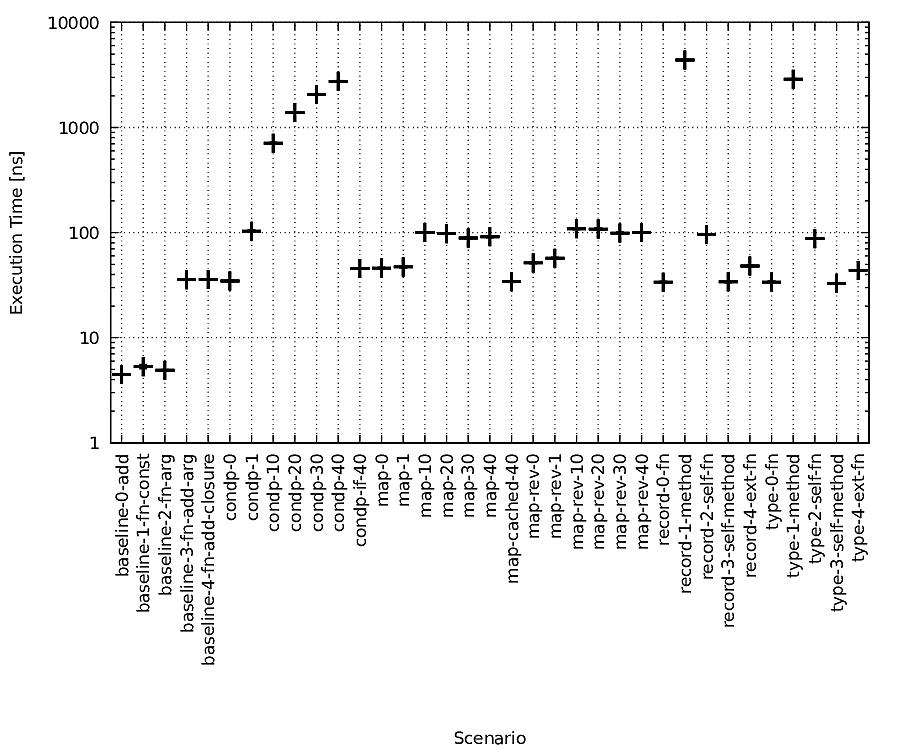
There are various ways for implementing objects or object-like constructs with Clojure. Besides differences with respect to implementation aspects, these ways also differ with respect to their performance. In this post, I write about the results of some simple benchmarks for evaluating the performance of some approaches that I could find in books and the Internet. If you are just interested in the overview, just scroll down to the performance overview plot that is located close to the end of this post.

Introduction and Motivation

For modelling data, I actually like generic data types such as maps, vectors, etc. and Clojures functionality for dealing with these generic data types very much. However, in certain circumstances, I like to use “classical objects” in which I encapsulate certain elements and that provide methods for interacting with the encapsulated entities.

An example of a situation in which I like to use “classical objects” is when a resource, e.g. a connection, has to be created and various operations need to be performed with this resource. Examples of such resources are: network sockets, JMS connections, or database connections. Examples of operations that I want to perform with these resources are: transmitting data, acquiring performance statistics, or closing the resource.

While there are already various posts etc. about the implementation or engineering aspects related to using object-like functionality in Clojure, I missed a comparison of the corresponding performance aspects. I think that, to certain extend, the choice which approach is used or if object-like behavior is used at all is a matter of taste. However, taking the aforementioned examples, such as communication or database connections, performance is an important aspect.

In the remainder of this post, I first outline the ways for implementing object-like behavior that were analyzed. Afterwards, the results of the performance benchmarks are shown.

Ways for Implementing Object(-like) Functionality in Clojure

The intention of this section is not to provide an in-depth discussion of ways for implementing object-like functionality in Clojure. The aim is rather to provide an overview of the working principles of the analyzed methods.

defprotocol and deftype/defrecord

The use of defprotocol in conjunction with deftype/defrecord is, e.g., discussed in:
https://dzone.com/articles/object-oriented-clojure
http://thinkrelevance.com/blog/2013/11/07/when-should-you-use-clojures-object-oriented-features

In the following listing, extracts for an example of this approach using defprotocol and defrecord are shown. The working principles for deftype are similar.

(defprotocol WithConnection
 (send [this data])
 (close [this]
 ...))

(defrecord ConnectionWrapper [resource]
 WithConnection
 (send [_ data] (.send resource data))
 (close [_] (.close resource))
 IFn
 (invoke [this data] (send this data)))

(defn create-connection
 [...]
 (let [resource (...)]
 (->ConnectionWrapper resource)))

(...
 (let [c (create-connection ...)]
 ; Send via "send" method defined in WithConnection.
 (send c "my data")
 ; By implementing IFn the object itself can also be used as a function.
 (c "my data")
 (close c)))

In the example, a “resource” is wrapped in an object and the object provides methods for interacting with the resource. In addition to the definition of the “send” method, the example also shows that a record can implement IFn such that the corresponding objects can be used as functions.

Closure with Functions in a Map

In “The Joy of Clojure” by Michael Fogus and Chris Houser, Manning, 2011, pp. 139-140, an example of implementing object-like functionality via closures and a returned map with functions is given. In “Let over Lambda” by Doug Hoyte, 2008, pp. 32-33, a similar way for implementing object-like functionality by using a closure and returning a list of multiple functions is given.

In the following listing, extracts for an example of this approach are shown:

(defn create-connection
 [...]
 (let [resource (...)]
 {:send (fn [arg] (.send resource arg))
 :close (fn [] (.close resource))
 ...}))

(defn send
 [conn arg]
 ((conn :send) arg))

(defn close
 [conn]
 ((conn :close)))

(...
 (let [c (create-connection ...)]
 (send c "my data")
 (close c)))

The example follows the same usage scenario as the previously given scenario for defrecord. In order to ease the method calls, additional functions are used to hide the map-based implications. Instead of functions, macros could be used as well but I just show functions here for illustration purposes.

Closure with Function Dispatch based on Keywords

In http://pramode.net/clojure/2010/05/26/creating-objects-in-clojure/ and “Clojure in Action” by Amit Rathore, Manning, 2012, pp. 326-328, closures and function dispatch based on keywords are used for mimicking object-like behavior. While I have to confess that I also used similar implementations in some of my older projects, I would not use this approach anymore. Seen from today’s perspective, I consider this as a rather complicated and inflexible way for achieving object-like functionality. Furthermore, the results of the performance evaluation shown in this post also indicate that, depending on the actual setting, the performance is inferior compared to the other approaches.

In the following, an example for this way of achieving object-like functionality is shown:

(defn create-connection
 [...]
 (let [resource (...)]
 (fn [arg]
 (condp =
 :close (.close resource)
 ...
 (.send resource arg)))))

(defn close
 [conn]
 (conn :close))

(...
 (let [c (create-connection ...)]
 (c "my data")
 (close c))

The example follows the same usage scenario as the other two examples.

Performance Result

In the following, at first, the tested scenarios are outlined. Subsequently, plots showing the results of the benchmarks are shown and described briefly. Afterwards, the procedure of how the benchmarks were performed is summarized and links to the benchmark code and raw data are given. The entire benchmark code including the post-processing scripts is available as Open Source Software, so you can give it a shot on your own.

Tested Scenarios

Below, the tested scenarios are outlined.
For more details, please have a look at the source code for which links are given below.

The tested scenarios can be roughly distinguished as follows:

  • baseline measurements for providing a basis for comparisons,
  • measurements for the approach based on keywords and condp (condp-x),
  • measurements for the map-based approach (map-x),
  • and measurements for the deftype and defrecord based approaches (record-x and type-x).

The baseline measurements tested the following scenarios:

  • adding two constants (baseline-0-add),
  • calling an fn returning a constant (baseline-1-fn-const),
  • calling an fn with an argument returning the argument as-is (baseline-2-fn-arg),
  • calling an fn that adds a constant value to the fn argument (baseline-3-fn-add-arg),
  • and calling an fn that uses a closure to add a pre-defined value to the fn argument (baseline-4-fn-add-closure).

For the condp-based scenario, the number of tests of the condp expression were varied. The actual operation that was to be performed was in the final default clause of the condp expression. The value x in the scenario description condp-x matches the number of tests that preceded the final default clause.

For the map-based tests, the number of key-value pairs in the map was varied. The value x in map-x is the number of key-value pairs that were added in addition to the actual entry that was to be executed. For map-x, the map was used as fn and the keyword as argument: (m :kw). For map-rev-x, the keyword was used as fn and the map as argument: (:kw m).

For the defrecord and deftype based approaches, the following situations were considered:

  • calling the fn defined in the implemented protocol as function and passing the object etc. as arguments: (f obj arg)
  • calling the fn defined in the implemented protocol as method of the object: (.f obj arg)
  • calling the object as fn (The type/record implements IFn.) and using the fn-way for forwarding the call to the actual processing functionality.
  • calling the object as fn (The type/record implements IFn.) and using the method-way for forwarding the call to the actual processing functionality.
  • calling an fn that wasadded by extending the protocol.

Result Plots

In the figure below, an overview of the absolute execution time is shown. Please not that the y-axis uses a logarithmic scale. The shown values are the mean values as reported by Criterium. In addition, the standard deviation is shown with error bars. However, due to the small standard deviation, these error bars are hardly visible.

2016-04-12_20-55_colin_FreeBSD_out_1

In the figure below, an overview of the relative execution time of the same result data as shown in the previous figure is shown. The result of scenario “baseline-4-fn-add-closure” was used as reference for the calculation of the relative values. Please note that the y-axis is linear and that the y-axis range was purposely chosen to focus on the majority of results at the expense of accepting that some values could not be fit on the plot.

2016-04-12_20-55_colin_FreeBSD_out_2

Benchmark Procedure and Source Code

For the execution of the benchmarks, criterium (https://github.com/hugoduncan/criterium) was used. Criterium automatically takes care of warm-up, repeated measurement execution, statistics calculation etc. Please note: even though the source code contains “quick-bench” right now, the benchmarks were done with “bench” (In the meantime, I changed the default to “bench”.).

Each benchmark scenario was implemented as separate Clojure test and the tests were all run via Leiningen. The source code of the benchmarks is available as Open Source Software: https://github.com/ruedigergad/clojure-method-call-benchmark/

Concluding Remarks

The evaluated scenarios were purposely chosen to be comparably simple. There may also be many more variations that could be assessed, such as other ways for implementing object-like behavior, the impact of type hints and reflection, or permutations of these aspects. However, for me, I found these results already quite interesting and I hope that the results or the benchmark code itself are useful for others as well. Comments and suggestions are always appreciated.


Posted in Misc., Other Software, Snippets | Tagged , | 2 Comments

Note to self: get information about the camera in SailfishOS

This is just a brief note to self about getting information about the camera in SailfishOS with v4l-utils.
This post primarily consists of a list of some commands that showed me some, hopefully useful, information and the corresponding output.
Maybe this is useful for someone else as well.

First of all, one has to install v4l-utils.
This can be done as follows:

zypper ar http://repo.merproject.org/obs/home:/nielnielsen/sailfish_latest_armv7hl/home:nielnielsen.repo
zypper ref home_nielnielsen
pkcon install v4l-utils

At first, outputs that were taken on a OnePlus One smartphone running SailfishOS are shown (Later on, I also put the corresponding outputs from the original Jolla phone.).
The kernel with which I took the data from the OnePlus One was:

[root@localhost ~]# uname -a
Linux localhost 3.4.67-cyanogenmod-gb4c3166-dirty #4 SMP PREEMPT Mon Jan 4 19:14:07 UTC 2016 armv7l armv7l armv7l GNU/Linux

[root@localhost ~]# ll /dev/video
total 0
lrwxrwxrwx 1 root root 12 Feb 27 13:07 venus_dec -> /dev/video32
lrwxrwxrwx 1 root root 12 Feb 27 13:07 venus_enc -> /dev/video33

Below are commands that provided some information about the video subsystem including their output:

[root@localhost nemo]# v4l2-ctl --list-devices
VIDIOC_QUERYCAP: failed: Invalid argument
VIDIOC_QUERYCAP: failed: Inappropriate ioctl for device
VIDIOC_QUERYCAP: failed: Invalid argument
VIDIOC_QUERYCAP: failed: Inappropriate ioctl for device
msm_vdec_8974 ():
	/dev/video32
	/dev/video33
	/dev/video34
	/dev/video35
	/dev/video38
	/dev/v4l-subdev6
	/dev/v4l-subdev0
	/dev/v4l-subdev1
	/dev/v4l-subdev2
	/dev/v4l-subdev3
	/dev/v4l-subdev4
	/dev/v4l-subdev5
	/dev/v4l-subdev7
	/dev/v4l-subdev8
	/dev/v4l-subdev9
	/dev/v4l-subdev10
	/dev/v4l-subdev11
	/dev/v4l-subdev12
	/dev/v4l-subdev13
	/dev/v4l-subdev14
	/dev/v4l-subdev15
	/dev/v4l-subdev16
	/dev/v4l-subdev17

���� (c���pKͶ):
	/dev/video1
	/dev/video2

Failed to open /dev/video0: Device or resource busy

[root@localhost nemo]# v4l2-ctl -D -d /dev/video32
Driver Info (not using libv4l2):
	Driver name   : msm_vidc_driver
	Card type     : msm_vdec_8974
	Bus info      : 
	Driver version: 0.0.1
	Capabilities  : 0x04003000
		Video Capture Multiplanar
		Video Output Multiplanar
		Streaming
[root@localhost nemo]# v4l2-ctl -D -d /dev/video33
Driver Info (not using libv4l2):
	Driver name   : msm_vidc_driver
	Card type     : msm_venc_8974
	Bus info      : 
	Driver version: 0.0.1
	Capabilities  : 0x04003000
		Video Capture Multiplanar
		Video Output Multiplanar
		Streaming
[root@localhost nemo]# v4l2-ctl -D -d /dev/video38
Driver Info (not using libv4l2):
	Driver name   : wifi-display
	Card type     : msm
	Bus info      : 
	Driver version: 0.0.1
	Capabilities  : 0x04000001
		Video Capture
		Streaming

[root@localhost nemo]# v4l2-ctl -V -d /dev/video32
VIDIOC_G_FMT: failed: Resource temporarily unavailable
[root@localhost nemo]# v4l2-ctl -V -d /dev/video33
VIDIOC_G_FMT: failed: Resource temporarily unavailable
[root@localhost nemo]# v4l2-ctl -V -d /dev/video38
Format Video Capture:
	Width/Height  : 1280/720
	Pixel Format  : 'H264'
	Field         : Any
	Bytes per Line: 0
	Size Image    : 1413120
	Colorspace    : Unknown (00000000)

[root@localhost nemo]# v4l2-ctl --list-formats -d /dev/video32     
ioctl: VIDIOC_ENUM_FMT
	Index       : 0
	Type        : Video Capture Multiplanar
	Pixel Format: 'NV12'
	Name        : Y/CbCr 4:2:0

[root@localhost nemo]# v4l2-ctl --list-formats -d /dev/video33 
ioctl: VIDIOC_ENUM_FMT
	Index       : 0
	Type        : Video Capture Multiplanar
	Pixel Format: 'MPG4'
	Name        : Mpeg4 compressed format

	Index       : 1
	Type        : Video Capture Multiplanar
	Pixel Format: 'H263'
	Name        : H263 compressed format

	Index       : 2
	Type        : Video Capture Multiplanar
	Pixel Format: 'H264'
	Name        : H264 compressed format

	Index       : 3
	Type        : Video Capture Multiplanar
	Pixel Format: 'VP80'
	Name        : VP8 compressed format

[root@localhost nemo]# v4l2-ctl --list-formats -d /dev/video38
ioctl: VIDIOC_ENUM_FMT

[root@localhost ~]# v4l2-sysfs-path -d

Device fd8c0000.qcom,msm-cam:
	video0(video, dev 81:6) v4l-subdev0(v4l subdevice, dev 81:7) v4l-subdev1(v4l subdevice, dev 81:8) v4l-subdev10(v4l subdevice, dev 81:17) v4l-subdev11(v4l subdevice, dev 81:19) v4l-subdev12(v4l subdevice, dev 81:21) v4l-subdev13(v4l subdevice, dev 81:22) v4l-subdev14(v4l subdevice, dev 81:23) v4l-subdev15(v4l subdevice, dev 81:24) v4l-subdev16(v4l subdevice, dev 81:25) v4l-subdev17(v4l subdevice, dev 81:26) v4l-subdev2(v4l subdevice, dev 81:9) v4l-subdev3(v4l subdevice, dev 81:10) v4l-subdev4(v4l subdevice, dev 81:11) v4l-subdev5(v4l subdevice, dev 81:12) v4l-subdev6(v4l subdevice, dev 81:13) v4l-subdev7(v4l subdevice, dev 81:14) v4l-subdev8(v4l subdevice, dev 81:15) v4l-subdev9(v4l subdevice, dev 81:16) 
Device fda0c000.qcom,cci/20.qcom,camera:
	video1(video, dev 81:18) 
Device fda0c000.qcom,cci/6c.qcom,camera:
	video2(video, dev 81:20) 
Device fe02c000:
	hw:0(sound card, dev 0:0) hw:0,0(pcm capture, dev 116:60) hw:0,1(pcm capture, dev 116:58) hw:0,10(pcm capture, dev 116:44) hw:0,11(pcm capture, dev 116:42) hw:0,12(pcm capture, dev 116:40) hw:0,13(pcm capture, dev 116:38) hw:0,14(pcm capture, dev 116:36) hw:0,15(pcm capture, dev 116:34) hw:0,16(pcm capture, dev 116:30) hw:0,17(pcm capture, dev 116:29) hw:0,19(pcm capture, dev 116:26) hw:0,2(pcm capture, dev 116:56) hw:0,20(pcm capture, dev 116:24) hw:0,22(pcm capture, dev 116:21) hw:0,23(pcm capture, dev 116:19) hw:0,24(pcm capture, dev 116:17) hw:0,25(pcm capture, dev 116:15) hw:0,26(pcm capture, dev 116:14) hw:0,27(pcm capture, dev 116:13) hw:0,28(pcm capture, dev 116:12) hw:0,29(pcm capture, dev 116:11) hw:0,3(pcm capture, dev 116:54) hw:0,30(pcm capture, dev 116:10) hw:0,31(pcm capture, dev 116:9) hw:0,32(pcm capture, dev 116:8) hw:0,34(pcm capture, dev 116:6) hw:0,35(pcm capture, dev 116:5) hw:0,36(pcm capture, dev 116:3) hw:0,5(pcm capture, dev 116:51) hw:0,6(pcm capture, dev 116:49) hw:0,8(pcm capture, dev 116:46) hw:0,0(pcm output, dev 116:59) hw:0,1(pcm output, dev 116:57) hw:0,10(pcm output, dev 116:43) hw:0,11(pcm output, dev 116:41) hw:0,12(pcm output, dev 116:39) hw:0,13(pcm output, dev 116:37) hw:0,14(pcm output, dev 116:35) hw:0,15(pcm output, dev 116:31) hw:0,17(pcm output, dev 116:28) hw:0,19(pcm output, dev 116:25) hw:0,2(pcm output, dev 116:55) hw:0,20(pcm output, dev 116:23) hw:0,21(pcm output, dev 116:22) hw:0,22(pcm output, dev 116:20) hw:0,23(pcm output, dev 116:18) hw:0,24(pcm output, dev 116:16) hw:0,3(pcm output, dev 116:53) hw:0,33(pcm output, dev 116:7) hw:0,35(pcm output, dev 116:4) hw:0,36(pcm output, dev 116:2) hw:0,4(pcm output, dev 116:52) hw:0,5(pcm output, dev 116:50) hw:0,6(pcm output, dev 116:48) hw:0,7(pcm output, dev 116:47) hw:0(mixer, dev 116:62) hw:0,1000(sound hardware, dev 116:61) comprC0D18(unknown, dev 116:27) comprC0D9(unknown, dev 116:45) 
Device virtual0:
	video32(video, dev 81:0) 
Device virtual1:
	video33(video, dev 81:1) 
Device virtual2:
	video34(video, dev 81:2) 
Device virtual3:
	video35(video, dev 81:3) 
Device virtual4:
	video38(video, dev 81:4) 
Device virtual5:
	video39(video, dev 81:5) 
Device virtual6:
	timer(sound timer, dev 116:33) 

[root@localhost ~]# v4l2-ctl -P -d /dev/video32
Streaming Parameters Video Capture:
	Frames per second: invalid (0/0)
	Read buffers     : 0
[root@localhost ~]# v4l2-ctl -P -d /dev/video33
Streaming Parameters Video Capture:
	Frames per second: invalid (0/0)
	Read buffers     : 0
[root@localhost ~]# v4l2-ctl -P -d /dev/video38
VIDIOC_G_PARM: failed: Invalid argument

[root@localhost ~]# v4l2-ctl --list-formats-out -d /dev/video32
ioctl: VIDIOC_ENUM_FMT
	Index       : 0
	Type        : Video Output Multiplanar
	Pixel Format: 'MPG4' (compressed)
	Name        : Mpeg4 compressed format

	Index       : 1
	Type        : Video Output Multiplanar
	Pixel Format: 'MPG2' (compressed)
	Name        : Mpeg2 compressed format

	Index       : 2
	Type        : Video Output Multiplanar
	Pixel Format: 'H263' (compressed)
	Name        : H263 compressed format

	Index       : 3
	Type        : Video Output Multiplanar
	Pixel Format: 'VC1G' (compressed)
	Name        : VC-1 compressed format

	Index       : 4
	Type        : Video Output Multiplanar
	Pixel Format: 'VC1L' (compressed)
	Name        : VC-1 compressed format G

	Index       : 5
	Type        : Video Output Multiplanar
	Pixel Format: 'H264' (compressed)
	Name        : H264 compressed format

	Index       : 6
	Type        : Video Output Multiplanar
	Pixel Format: 'HEVC' (compressed)
	Name        : HEVC compressed format

	Index       : 7
	Type        : Video Output Multiplanar
	Pixel Format: 'HVCH' (compressed)
	Name        : HEVC compressed format

	Index       : 8
	Type        : Video Output Multiplanar
	Pixel Format: 'VP80' (compressed)
	Name        : VP8 compressed format

	Index       : 9
	Type        : Video Output Multiplanar
	Pixel Format: 'DIV3' (compressed)
	Name        : DIVX 311 compressed format

	Index       : 10
	Type        : Video Output Multiplanar
	Pixel Format: 'DIVX' (compressed)
	Name        : DIVX 4/5/6 compressed format

[root@localhost ~]# v4l2-ctl --list-formats-out -d /dev/video33
ioctl: VIDIOC_ENUM_FMT
	Index       : 0
	Type        : Video Output Multiplanar
	Pixel Format: 'NV12' (compressed)
	Name        : Y/CbCr 4:2:0

	Index       : 1
	Type        : Video Output Multiplanar
	Pixel Format: 'NV21' (compressed)
	Name        : Y/CrCb 4:2:0

[root@localhost ~]# v4l2-ctl --list-formats-out -d /dev/video38
ioctl: VIDIOC_ENUM_FMT

Finally, the corresponding outputs from the original Jolla phone are shown. The kernel used on the Jolla phone was:

[root@Jolla nemo]# uname -a
Linux Jolla 3.4.108.20150901.1 #1 SMP PREEMPT Thu Sep 17 18:32:22 UTC 2015 armv7l armv7l armv7l GNU/Linux

[root@Jolla nemo]# ll /dev/video
ls: cannot access /dev/video: No such file or directory

The output of the video related information is shown below:

[root@localhost nemo]# v4l2-ctl --list-devices
# The device reboots reproducibly and thus no data could be obtained.

root@Jolla nemo]# v4l2-ctl -D -d /dev/video0 
Driver Info (not using libv4l2):
	Driver name   : 
	Card type     : 
	Bus info      : 
	Driver version: 3.4.108
	Capabilities  : 0x04000001
		Video Capture
		Streaming

[root@Jolla nemo]# v4l2-ctl -D -d /dev/video1 
Driver Info (not using libv4l2):
	Driver name   : ov8825
	Card type     : 
	Bus info      : 
	Driver version: 3.4.108
	Capabilities  : 0x04000001
		Video Capture
		Streaming

[root@Jolla nemo]# v4l2-ctl -D -d /dev/video2
Driver Info (not using libv4l2):
	Driver name   : 
	Card type     : 
	Bus info      : 
	Driver version: 3.4.108
	Capabilities  : 0x04000001
		Video Capture
		Streaming

[root@Jolla nemo]# v4l2-ctl -D -d /dev/video3
Driver Info (not using libv4l2):
	Driver name   : ov2675
	Card type     : 
	Bus info      : 
	Driver version: 3.4.108
	Capabilities  : 0x04000001
		Video Capture
		Streaming
[root@Jolla nemo]# v4l2-ctl -D -d /dev/video38
Driver Info (not using libv4l2):
	Driver name   : wifi-display
	Card type     : msm
	Bus info      : 
	Driver version: 0.0.1
	Capabilities  : 0x04000001
		Video Capture
		Streaming
[root@Jolla nemo]# v4l2-ctl -D -d /dev/video39
Failed to open /dev/video39: No such device
[root@Jolla nemo]# v4l2-ctl -D -d /dev/video100
VIDIOC_QUERYCAP: failed: Inappropriate ioctl for device
/dev/video100: not a v4l2 node

[root@Jolla nemo]# v4l2-ctl -V -d /dev/video0
Format Video Capture:
	Width/Height  : 0/0
	Pixel Format  : ''
	Field         : Any
	Bytes per Line: 0
	Size Image    : 0
	Colorspace    : Unknown (00000000)
[root@Jolla nemo]# v4l2-ctl -V -d /dev/video1
Format Video Capture:
	Width/Height  : 0/0
	Pixel Format  : ''
	Field         : Any
	Bytes per Line: 0
	Size Image    : 0
	Colorspace    : Unknown (00000000)
[root@Jolla nemo]# v4l2-ctl -V -d /dev/video2
Format Video Capture:
	Width/Height  : 0/0
	Pixel Format  : ''
	Field         : Any
	Bytes per Line: 0
	Size Image    : 0
	Colorspace    : Unknown (00000000)
[root@Jolla nemo]# v4l2-ctl -V -d /dev/video3
Format Video Capture:
	Width/Height  : 0/0
	Pixel Format  : ''
	Field         : Any
	Bytes per Line: 0
	Size Image    : 0
	Colorspace    : Unknown (00000000)
[root@Jolla nemo]# v4l2-ctl -V -d /dev/video38
Format Video Capture:
	Width/Height  : 640/480
	Pixel Format  : 'H264'
	Field         : Any
	Bytes per Line: 0
	Size Image    : 462848
	Colorspace    : Unknown (00000000)
[root@Jolla nemo]# v4l2-ctl -V -d /dev/video39
Failed to open /dev/video39: No such device
[root@Jolla nemo]# v4l2-ctl -V -d /dev/video100
VIDIOC_QUERYCAP: failed: Inappropriate ioctl for device
/dev/video100: not a v4l2 node

[root@Jolla nemo]# v4l2-ctl --list-formats -d /dev/video0
ioctl: VIDIOC_ENUM_FMT
	Index       : 0
	Type        : Video Capture
	Pixel Format: 'NV12'
	Name        : NV12BAYER

	Index       : 1
	Type        : Video Capture
	Pixel Format: 'NV21'
	Name        : NV21BAYER

	Index       : 2
	Type        : Video Capture
	Pixel Format: 'NV16'
	Name        : NV16BAYER

	Index       : 3
	Type        : Video Capture
	Pixel Format: 'NV61'
	Name        : NV61BAYER

	Index       : 4
	Type        : Video Capture
	Pixel Format: 'YM12'
	Name        : YU12BAYER

	Index       : 5
	Type        : Video Capture
	Pixel Format: 'BG10'
	Name        : RAWBAYER

	Index       : 6
	Type        : Video Capture
	Pixel Format: 'STAE'
	Name        : SAEC

	Index       : 7
	Type        : Video Capture
	Pixel Format: 'STWB'
	Name        : SAWB

	Index       : 8
	Type        : Video Capture
	Pixel Format: 'STAF'
	Name        : SAFC

	Index       : 9
	Type        : Video Capture
	Pixel Format: 'IHST'
	Name        : SHST

[root@Jolla nemo]# 
[root@Jolla nemo]# v4l2-ctl --list-formats -d /dev/video1
ioctl: VIDIOC_ENUM_FMT
	Index       : 0
	Type        : Video Capture
	Pixel Format: 'NV12'
	Name        : NV12BAYER

	Index       : 1
	Type        : Video Capture
	Pixel Format: 'NV21'
	Name        : NV21BAYER

	Index       : 2
	Type        : Video Capture
	Pixel Format: 'NV16'
	Name        : NV16BAYER

	Index       : 3
	Type        : Video Capture
	Pixel Format: 'NV61'
	Name        : NV61BAYER

	Index       : 4
	Type        : Video Capture
	Pixel Format: 'YM12'
	Name        : YU12BAYER

	Index       : 5
	Type        : Video Capture
	Pixel Format: 'BG10'
	Name        : RAWBAYER

	Index       : 6
	Type        : Video Capture
	Pixel Format: 'STAE'
	Name        : SAEC

	Index       : 7
	Type        : Video Capture
	Pixel Format: 'STWB'
	Name        : SAWB

	Index       : 8
	Type        : Video Capture
	Pixel Format: 'STAF'
	Name        : SAFC

	Index       : 9
	Type        : Video Capture
	Pixel Format: 'IHST'
	Name        : SHST

[root@Jolla nemo]# 
[root@Jolla nemo]# v4l2-ctl --list-formats -d /dev/video2
ioctl: VIDIOC_ENUM_FMT
	Index       : 0
	Type        : Video Capture
	Pixel Format: 'NV12'
	Name        : NV12YUV

	Index       : 1
	Type        : Video Capture
	Pixel Format: 'NV21'
	Name        : NV21YUV

	Index       : 2
	Type        : Video Capture
	Pixel Format: 'YUYV'
	Name        : YUYV

[root@Jolla nemo]# 
[root@Jolla nemo]# v4l2-ctl --list-formats -d /dev/video3
ioctl: VIDIOC_ENUM_FMT
	Index       : 0
	Type        : Video Capture
	Pixel Format: 'NV12'
	Name        : NV12YUV

	Index       : 1
	Type        : Video Capture
	Pixel Format: 'NV21'
	Name        : NV21YUV

	Index       : 2
	Type        : Video Capture
	Pixel Format: 'YUYV'
	Name        : YUYV

[root@Jolla nemo]# 
[root@Jolla nemo]# v4l2-ctl --list-formats -d /dev/video38
ioctl: VIDIOC_ENUM_FMT
[root@Jolla nemo]# v4l2-ctl --list-formats -d /dev/video39
Failed to open /dev/video39: No such device
[root@Jolla nemo]# v4l2-ctl --list-formats -d /dev/video100
VIDIOC_QUERYCAP: failed: Inappropriate ioctl for device
/dev/video100: not a v4l2 node

[root@Jolla nemo]# v4l2-sysfs-path -d

Device i2c-4/4-002a:
	video0(video, dev 81:1) 
Device i2c-4/4-0060:
	video2(video, dev 81:4) 
Device platform/msm_cam_server.0:
	video100(video, dev 81:0) v4l-subdev0(v4l subdevice, dev 81:3) v4l-subdev1(v4l subdevice, dev 81:6) v4l-subdev10(v4l subdevice, dev 81:15) v4l-subdev2(v4l subdevice, dev 81:7) v4l-subdev3(v4l subdevice, dev 81:8) v4l-subdev4(v4l subdevice, dev 81:9) v4l-subdev5(v4l subdevice, dev 81:10) v4l-subdev6(v4l subdevice, dev 81:11) v4l-subdev7(v4l subdevice, dev 81:12) v4l-subdev8(v4l subdevice, dev 81:13) v4l-subdev9(v4l subdevice, dev 81:14) 
Device platform/soc-audio.0:
	hw:0(sound card, dev 0:0) hw:0,0(pcm capture, dev 116:27) hw:0,1(pcm capture, dev 116:25) hw:0,10(pcm capture, dev 116:10) hw:0,12(pcm capture, dev 116:7) hw:0,13(pcm capture, dev 116:5) hw:0,14(pcm capture, dev 116:3) hw:0,2(pcm capture, dev 116:23) hw:0,3(pcm capture, dev 116:21) hw:0,5(pcm capture, dev 116:18) hw:0,6(pcm capture, dev 116:16) hw:0,8(pcm capture, dev 116:13) hw:0,9(pcm capture, dev 116:12) hw:0,0(pcm output, dev 116:26) hw:0,1(pcm output, dev 116:24) hw:0,10(pcm output, dev 116:9) hw:0,11(pcm output, dev 116:8) hw:0,12(pcm output, dev 116:6) hw:0,13(pcm output, dev 116:4) hw:0,14(pcm output, dev 116:2) hw:0,2(pcm output, dev 116:22) hw:0,3(pcm output, dev 116:20) hw:0,4(pcm output, dev 116:19) hw:0,5(pcm output, dev 116:17) hw:0,6(pcm output, dev 116:15) hw:0,7(pcm output, dev 116:14) hw:0,9(pcm output, dev 116:11) hw:0(mixer, dev 116:28) 
Device virtual0:
	video1(video, dev 81:2) 
Device virtual1:
	video3(video, dev 81:5) 
Device virtual2:
	video38(video, dev 81:16) 
Device virtual3:
	video39(video, dev 81:17) 
Device virtual4:
	timer(sound timer, dev 116:33) 

[root@Jolla nemo]# v4l2-ctl -P -d /dev/video0
VIDIOC_G_PARM: failed: Invalid argument
[root@Jolla nemo]# 
[root@Jolla nemo]# v4l2-ctl -P -d /dev/video1
VIDIOC_G_PARM: failed: Invalid argument
[root@Jolla nemo]# 
[root@Jolla nemo]# v4l2-ctl -P -d /dev/video2
VIDIOC_G_PARM: failed: Invalid argument
[root@Jolla nemo]# 
[root@Jolla nemo]# v4l2-ctl -P -d /dev/video3
VIDIOC_G_PARM: failed: Invalid argument
[root@Jolla nemo]# v4l2-ctl -P -d /dev/video38
VIDIOC_G_PARM: failed: Invalid argument
[root@Jolla nemo]# v4l2-ctl -P -d /dev/video39
Failed to open /dev/video39: No such device
[root@Jolla nemo]# v4l2-ctl -P -d /dev/video100
VIDIOC_QUERYCAP: failed: Inappropriate ioctl for device
/dev/video100: not a v4l2 node

[root@Jolla nemo]# v4l2-ctl --list-formats-out -d /dev/video0
ioctl: VIDIOC_ENUM_FMT
[root@Jolla nemo]# 
[root@Jolla nemo]# v4l2-ctl --list-formats-out -d /dev/video1
ioctl: VIDIOC_ENUM_FMT
[root@Jolla nemo]# 
[root@Jolla nemo]# v4l2-ctl --list-formats-out -d /dev/video2
ioctl: VIDIOC_ENUM_FMT
[root@Jolla nemo]# 
[root@Jolla nemo]# v4l2-ctl --list-formats-out -d /dev/video3
ioctl: VIDIOC_ENUM_FMT
[root@Jolla nemo]# v4l2-ctl --list-formats-out -d /dev/video38
ioctl: VIDIOC_ENUM_FMT
[root@Jolla nemo]# v4l2-ctl --list-formats-out -d /dev/video39
Failed to open /dev/video39: No such device
[root@Jolla nemo]# v4l2-ctl --list-formats-out -d /dev/video100
VIDIOC_QUERYCAP: failed: Inappropriate ioctl for device
/dev/video100: not a v4l2 node


Posted in Misc. | Tagged , , | Leave a comment

test2junit 1.2.1 released

This is a brief post to announce the release of test2junit 1.2.1.

For those who do not know test2junit yet, here is the brief description from the readme: Test2junit is “a leiningen plug-in to output test results to JUnit XML format. These files can be used, e.g., with junitreport for creating reports in HTML format.” Examples for an HTML version of such test output can be seen, e.g., for the clj-assorted-utils project: HTML test results or for the cli4clj project: HTML test results.

Version 1.2.1 adds two more options for setting the output directory: the environment variable ” TEST2JUNIT_OUTPUT_DIR” and the Java system property “test2junit.output.dir”. Thanks again to erez-rabih, for requesting this additional feature.

Posted in test2junit, Uncategorized | Tagged , , , | Leave a comment

Note to self: Getting vim-eastwood to work.

This is primarily a brief note to self but maybe someone else may find this useful as well. I learned about eastwood and vim-eastwood some time ago and initially struggled a bit with getting it to work properly.

I installed vim-eastwood and syntastic following the instructions that can be found in the respective readme files. I also “installed”/”enabled” eastwood by adding to my ~/.lein/profiles.clj as follows:

{:user {:plugins [[jonase/eastwood "0.2.2"]] }}

Eastwood itself already worked this way by running “lein eastwood”. However, when running “:SyntasticCheck” in Vim, I got the following error message (The message actually shows up pretty briefly but it can be shown again with “:Errors”.):

... |381 error| ClassNotFoundException eastwood.lint java.net.URLClassLoader.findClass (URLClassLoader.java:381)

Entering “(require ‘eastwood.lint)” in the REPL showed that eastwood was not found on the classpath:

=> (require 'eastwood.lint)
=> FileNotFoundException Could not locate eastwood/lint__init.class or eastwood/lint.clj on classpath. clojure.lang.RT.load (RT.java:449)

I could solve the problem by adding the following entry to the “project.clj” files of my Clojure projects:

:profiles {:repl {:dependencies [[jonase/eastwood "0.2.2" :exclusions [org.clojure/clojure]]]}}

To be honest, I am not sure if this is the suggested way for solving this problem. However, for me, this solves the issue that was stopping me from using vim-eastwood and I am very happy that I can use vim-eastwood since then.

Posted in Misc. | Tagged , , | Leave a comment

vim-todo-helper – Helper functionality for handling to-do items in Vim (and vimoutliner)

Some time ago, I stumbled across vimoutliner for organizing lists of to-dos. I am pretty happy with vimoutliner as it boils down to a very simple way for organizing to-do items. To-do items are stored in a plain text file and mark-up etc. is largely reduced. Effectively, managing to-do items is just a matter of editing a text file in Vim, with a few helper key bindings.

However, I wanted some more convenience functionality. So, I finally started to experiment with vimscript in order to implement the functionality I wanted. I called the result with which I came up with “vim-todo-helper” which is available via github. In this post, I briefly introduce vim-todo-helper.

The most improvements I wanted and thus that are currently implemented in vim-todo-helper are:

  • a modification date that is associated to to-do items and that gets automatically updated when an item is changed
  • a possibility to uniquely identify to-do items independently of their content or time stamp
  • the possibility to sort item according to their importance
  • means for keeping track of items that were deleted
  • and shortcuts, e.g., a template for speeding up the insertion of new items or a shortcut for cycling through importance tags.

In order to demonstrate how these features are intended for being used, below, a simple usage example is given. This example is directly taken from the readme of the vim-todo-helper github project:

Starting with an empty file, you can insert a new to-do item below the current line by pressing “+”. Alternatively, you can use “*” to insert a new to-do above the current line. A possible result is shown below. The “X” marks the spot at which the cursor will be placed.

[_] [3_Low] X <1> {2015-12-12_13:45:57}

You can see that the new entry has an unchecked check box “[_]”, a default priority of “3_Low”, an id of 1, and the date shows the date and time when the entry was created. In a normal work flow, you would now fill in some descriptive text to describe the new task/to-do.

The next example shows a few more sample entries:

[_] [3_Low] A low priority to-do <1> {2015-12-12_13:48:03}
[_] [3_Low] Another low prioroty to-do <2> {2015-12-12_13:48:12}
[_] [2_Normal] A higher priority to-do <3> {2015-12-12_13:48:26}
[_] [0_URGENT] An urgent task <4> {2015-12-12_13:48:40}

Side note: I use the setting “noremap t :call SetNextTag()” in my ~/.vimoutlinerrc to use “t” for cycling through the different priority levels when the cursor is placed on the priority entry.

The next example shows that the timestamps are updated whenever an item is changed:

[X] [3_Low] A low priority to-do (This was marked as done.) <1> {2015-12-12_13:50:03}
[_] [3_Low] Another low priority to-do (Fixed a typo here.) <2> {2015-12-12_13:51:18}
[_] [1_High] Change importance. <3> {2015-12-12_13:51:30}
[_] [0_URGENT] An urgent task <4> {2015-12-12_13:48:40}

When you write the file, a line will be added to the end of the file that contains some housekeeping meta data. The data in this line currently shows the highest used id and a list of deleted items. This data is intended for later use when synchronizing files between multiple computers/devices. An example of how this looks is shown below:

[X] [3_Low] A low priority to-do <1> {2015-12-12_13:50:03}
[_] [3_Low] Another low priority to-do (Fixed a typo here.) <2> {2015-12-12_13:51:18}
[_] [1_High] Change importance. <3> {2015-12-12_13:51:30}
[_] [0_URGENT] An urgent task <4> {2015-12-12_13:48:40}
: <4> {}

Please note that this meta data has to be in the very last line of the file, right now.

Last but not least, an example is given how the content looks after deleting some entries:

[X] [3_Low] A low priority to-do <1> {2015-12-12_13:53:49}
[_] [0_URGENT] An urgent task <4> {2015-12-12_13:48:40}
: <4> {2,3}

Please note: while I use vim-todo-helper in conjunction with vimoutliner, there is no dependency from vim-todo-helper to vimoutliner. vim-todo-helper currently works with “pure” Vim.

This was the first time I used vimscript. So, please bear with me when you look at the code or experience issues. Feedback such as improvement suggestions or contributions is always appreciated.

Posted in Announcements, Misc., Snippets | Tagged , , , | Leave a comment

cli4clj Version 1.0.0 Released

In this post, I announce the release of version 1.0.0 of cli4clj. Even though I was already fairly happy about the state of cli4clj as posted before, I decided to add some more improvements. In the following, I first provide an overview over the most important features of cli4clj. Subsequently, I outline the improvements since the last release.

The most important features of cli4clj are:

  • Simple configuration via maps
  • Command line history
  • Command line editing
  • Tab-completion
    • For command names
    • Hints for selected commands: based on function arguments and custom hints
  • Aliases can be used to define alternative command names, e.g., for shortcuts.
  • Clojure data types, e.g., vector, list, map, etc., can be used as command arguments.
  • Build-in help
  • Information about function arguments is displayed as help and completion hints.
  • Customizable, similar to the Clojure REPL
  • Functionality for testing CLIs via unit tests

Since the last release, the most important additions are tab-completion and the functionality to extract and display information about function arguments, both in help and tab-completion hints. Following the aim of cli4clj to reduce the effort for implementing a CLI, both features usually do not require additional effort to be used.

Two forms of tab-completion can be distinguished. Firstly, command names can be completed via tab-completion. When multiple completion options exist, a hint with the possible options is shown. Otherwise, the command name is completed.

Secondly, so called “completion hints” can be shown for commands. These completion hints are displayed when the tab-completion is triggered for commands that are already entered. By default, cli4clj tries to display information about function arguments, if such information could be found. In addition, a tab completion hint can be defined in the configuration.

For displaying information about function arguments, in the help and the completion hints, cli4clj extracts the identifiers of the function arguments. It can do this for globally defined functions that were defined via defn and for anonymous functions that were defined with fn when the respective functions and cli4clj configuration options are defined within the (start-cli {…}) expression. Please note that, for the fn-case, it is important that the anonymous functions are defined within the configuration options and that the configuration options are defined directly in the (start-cli {…}) expression and are not stored in a local or global var.

As usual, the new cli4clj version is already available via clojars. In addition, API docs and detailed test results are available via the cli4clj github repository.

Posted in cli4clj, Libs. | Tagged , , , | 5 Comments

Tesis Doctoral: Event-driven Principles and Complex Event Processing for Self-adaptive Network Analysis and Surveillance Systems

This is just a brief post to announce the publication of my tesis doctoral (doctoral thesis/PhD thesis/dissertation) entitled “Event-driven Principles and Complex Event Processing for Self-adaptive Network Analysis and Surveillance Systems“. The thesis is available via rodin.uca.es as open access under the terms of the Creative Commons Attribution-ShareAlike 4.0 International License Creative Commons License.

Besides papers that were published on scientific conferences and workshops, I also published many of the evaluation prototypes as Open Source Software. For an overview of all my published papers, not only those that were published in scope of my thesis, please see the list of my publications. I also already introduced some of the respective Open Source Software projects in posts on this blog and in a brief overview of my Open Source projects and contributions. I hope to publish some more details about these prototypes here in the future as my time permits it.

For now, I conclude by citing the acknowledgments of my tesis doctoral. I am deeply thankful for all the great support I had been given:

“First of all, I thank my beloved family, especially my wonderful wife, son, parents, and siblings. While the research and work during the thesis occupied much of my time, you always reminded and helped me to also esteem the other wonderful things in life. Your love, encouragement, and support are indispensable and I am deeply grateful. I love you.

I also thank my friends for their support and for always lending a sympathetic ear. I very
much enjoyed our discussions on- and off-topic with respect to my thesis scope and I am deeply thankful for your support.

Furthermore, I thank my supervisors Inma and Martin. Learning to research and to publish research results under your supervision was an exciting and fascinating experience that I enjoyed very much. I very much value your feedback and support which were very helpful and I am greatly thankful for having you as my supervisors.

I also thank my former and current colleagues with whom I had and still have the pleasure to work with. It was and still is a great experience to work in such a creative and inspiring environment. I very much value the fruitful discussions and exchange we had and look forward to more to come.

Moreover, I thank all the members of the UCASE research group at the University of Cádiz, especially Juan, Paco, Antonio, and Lorena. You supported me with very valuable feedback and have always been fabulous hosts when I visited you in Cádiz.

I also thank all members of the PhD students round table at the Frankfurt University of Applied Sciences and my colleagues from other universities with whom I worked with in various research projects. We always had great discussions and it was very valuable to me to meet and exchange with you.

Last but not least, I thank Rodion Iafarov and Ashutosh Shirole whom I supervised as student assistants and in scope of their Masters theses. I very much enjoyed to work with you and thank you very much for your contributions.”

Posted in Announcements, Misc. | Tagged , , , , | Leave a comment

Update on cli4clj for easing the implementation of CLIs in Clojure

In my last post, I introduced my first shot on cli4clj, which is intended to ease the implementation of command line interfaces (CLIs) in Clojure. Since then, I thought a lot about the future directions of cli4clj and did various experiments for further improving it. In this post, I first give an overview over the most important improvements and afterwards outline some more details about the new implementation and on how to use cli4clj.

The major improvements since the last version are:

  • Command history
  • Command line editing
  • Tab completion
  • Functionality for testing CLIs

Command history, command line editing, and tab completion are implemented with the help of jline2. While currently the command history is not persisted across CLI runs, jline2 also allows to store the history of commands such that perspectively this feature could be added as well. Tab completion currently only considers the available commands. These features are present out of the box and nothing special needs to be implemented for activating them.

With respect to testing CLIs, I added functionality for programmatically entering input and for evaluating the corresponding output. In a sense, programmatically entering input could be also considered as “scripting” actions in the CLI. For evaluating the output, the resulting string output, either to stdout or stderr, is returned which can then be used to verify that the CLI actions resulted in the desired behavior.

Simple examples for using the testing functionality are provided in the projects test implementation. For convenience, I also include two examples below:

(deftest add-cmd-cli-interaction-stdout-test
 (let [cli-opts {:cmds {:add {:fn #(+ %1 %2)}}}
       test-cmd-input ["add 1 2"]
       out-string (test-cli-stdout #(start-cli cli-opts) test-cmd-input)]
   (is (= "3" out-string))))

(deftest add-cmd-cli-interaction-stdout-multiline-test
 (let [cli-opts {:cmds {:add {:fn #(+ %1 %2)}}}
       test-cmd-input ["add 1 2" "add 3 4" "add 5 6"]
       out-string (test-cli-stdout #(start-cli cli-opts) test-cmd-input)]
   (is (= (expected-string ["3" "7" "11"]) out-string))))

The first example only covers a single command. The second example shows how multiple commands can be handled. Input commands are defined as a vector of strings in which each string corresponds to one line of input to the CLI. The “expected-string” function is a convenience function to format the expected strings into the format as will be emitted by the test-cli-xxxxx function (The most important point here is that the platform specific line delimiter will be used.). Furthermore, depending on the test case it may be desired to evaluate the output that is printed to either stdout or stderr. The above example show the functions for stdout. Below is an example for stderr:

(deftest add-cmd-cli-interaction-cmd-error-test
 (let [cli-opts {:cmds {:div {:fn #(/ %1 %2)}}}
       test-cmd-input ["div 1 0"]
       out-string (test-cli-stderr #(start-cli cli-opts) test-cmd-input)]
   (is (= "Divide by zero" out-string))))

My main use case for CLIs is to implement them in the -main method for launching them via simple “java -jar xxxxx” calls. Thus, I implemented the testing functionality such that it can also be easily used for testing -main methods without the need to pass additional parameters to these methods etc. Examples of how this is done can be seen in https://github.com/ruedigergad/cli4clj/blob/master/test/cli4clj/test/example.clj which demonstrates the testing functionality for the example -main method that is included cli4clj.

Overall, I am much happier with the current state of cli4clj right now. I think that it now suits my needs much better than before. I especially like the interactive features provided by jline2 and in addition the new testing capabilities which should ease the implementation and improve the understandability of tests.

As usual, the latest version of cli4clj is available on clojars. I hope that you consider cli4clj useful. Comments and inspirations are always highly appreciated.

Posted in cli4clj, Libs. | Tagged , , , | 1 Comment

Easing the Implementation of Simple Interactive CLIs for #Clojure Applications with cli4clj

tl;dr: cli4clj is a library for easing the implementation of interactive command line interfaces (CLIs) for Clojure applications. Currently, the main aim is to allow an easy implementation of a custom interactive CLI that is easily usable, even by people unfamiliar with Clojure. cli4clj is already available via Clojars.

This post is intended as a brief announcement of cli4clj. As my time is currently, unfortunately, pretty limited I cannot elaborate in depth on all the details. So, I will try to briefly outline my motivation for creating cli4clj, its purpose, (current) features, and how to use it.

Personally, I think that interactive CLIs are great, especially for experimenting and playing around with ideas. This is maybe one reason why I like to work with Clojure and its REPL.

In the past, I already added simple interactive CLIs to some of my applications and prototypes as they allow nice and easy interaction at run-time. An example is my Clojure clj-net-pcap prototype. However, my current implementation of this particular CLI is, well, lets say, very simple and naive. While this implementation approach of the CLI was sufficient back when I started clj-net-pcap, the CLI became increasingly complex over time.

For languages like Java there are libraries like cliche or the Spring Shell that aim on easing the implementation of “in-application” interactive CLIs. Unfortunately, I could not find an equivalent for Clojure that suited my needs.

While the Clojure REPL can also be started from within any third-party application, having a full-featured REPL as in-application CLI was too much for my taste. There is some quote that, “with great power comes great responsibility.” In a sense I invert this principle for cli4clj in the way that I want cli4clj to be easily usable, from implementation and CLI-usability perspective, (without having the user to worry about great or complex duties/responsibilities) and thus purposely reduce the set of available features as compared to the default Clojure REPL (limit the powers of the CLI). The result is a simple and easily implementable interactive CLI that can also be used by people who are not familiar with Clojure.

In the following listing, a simple example is shown. In this example, a command named “test” is defined for the CLI that simply prints a test message. You can also see definitions for short and long information texts that will be printed via the integrated “help” command.

(defn -main [& args]
  (let [cli-opts {:cmds {:test {:fn #(println "This is a test.")
                                :short-info "Test Command"
                                :long-info "Print a test message."}}}]
    (start-cli cli-opts)))

In the CLI, this looks as follows:

cli# test
This is a test.

Commands can also have arguments as shown in the next example for the “add” command. In addition, this example shows the definition of an alias, “a”, for being used as a shortcut to “add”.

(defn -main [& args]
  (let [cli-opts {:cmds {:add {:fn (fn [a b] (+ a b))
                               :short-info "Add two values."}
                         :a :add}}]
    (start-cli cli-opts)))

In the CLI, this looks as follows:

cli# add 1 2
3
cli# a 2 3
5

The functions that implement the actual functionality of the commands can be globally, locally, or anonymously defined. In my opinion, the capability to use locally and anonymously defined functions is great because it, e.g., allows to easily leverage closures for the CLI functionality.

A more complex and commented example of how cli4clj is intended to be used can be found in the example in the cli4clj GitHub repository. Furthermore, you can see some example output of a CLI session using this example code in the README on GitHub.

Current features of cli4clj are, e.g.:

  • Simple configuration via a map
  • Easily usable interactive CLI
  • Allows to use globally, locally, and anonymously defined functions
  • Clojure data types for command arguments, e.g., int, float, vector, list, set, …
  • Aliases for commands enable, e.g., shortcuts
  • Help command for displaying information about available commands.
  • Based on the Clojure REPL
  • Customizable similarly to the Clojure REPL

So far, I just put a few hours into implementing and documenting cli4clj. However, I am already very happy with the result, its features, and the usability. I also already uploaded cli4clj to Clojars. In the future, I plan to further work on cli4clj and improve it. One idea could be, e.g., to support named arguments like many Linux commands do, in the way “–foo” or “-f”, and to supply default values for options that are not explicitly set.

I hope that you find cli4clj helpful. All feedback, ideas, and contributions are highly appreciated.

Posted in Announcements, cli4clj, Libs. | Tagged , , , , | 1 Comment