
Inspired by a comment to my QML C++ Object Example I updated this example to also show how to work similarly with QML lists.
Exchange Data and Objects between C++ and QML and vice versa
In this post I show how to exchange data and objects between C++ and QML and vice versa. I initially created a simple example from some old code due to a question on IRC. While I was at it I decided to go a little further and add some more examples and also write this short note.
In the following listing the QML part is shown. This should also serve as a little appetizer such that you see what expects you in this post if you decide to read on. 😉
import QtQuick 1.0
import test 1.0

Rectangle {
  width: 360
  height: 360
  Text {
    id: textField
    text: qsTr("Click me.")
    anchors.centerIn: parent
  }
  MouseArea {
    anchors.fill: parent
    onClicked: {
      textField.text = "Clicked...";

      // Passing objects from QML to C++
      b.doA(aa);
      b.doC(c);

      // Setting a property works as expected as well.
      aa.test = "foobar";
      b.doA(aa);
      b.doC(c);

      // Dynamic object creation in QML
      var newA = Qt.createQmlObject('import QtQuick 1.0; import test 1.0; A {test: "foo"}', parent);
      b.doA(newA);

      // Object creation in C++ and passing to QML
      var anotherA = b.makeA();
      console.log(anotherA.test);

      // Use an object created in C++ in QML.
      c.a = anotherA;
      b.doC(c);

      // Using QML lists
      console.log("");
      d.doVl();
      console.log("");
      b.doVl(d.vl);

      // It is also possible to pass dynamically created lists.
      console.log("");
      b.doVl(["j1", 2, 3, "j4"]);

      // See the code of b.h to see how to access the objects in the list from C++.
      console.log("");
      b.doAlist([aa, aaa]);

      // Create a list of objects in C++ and use it in QML.
      console.log("");
      d.vl = b.makeAList();
      console.log(d.vl[0].test);
      console.log(d.vl[1].test);
    }
  }
  A{id: aa; test: "bar"}
  A{id: aaa; test: "blah"}
  B{id: b}
  C{id: c; a: aa}
  D{id: d;  vl: ["i1", "i2", 3, 4, aa]}
}
Simplictionary – A simple dictionary reader for N9/N950 (Harmattan)
Simplictionary is a simple reader for dictionaries in XDXF format. It is almost entirely written in QML (except the usual launcher part and a tiny helper class for getting a list of installed dictionaries from the filesystem).
You can download it from the homepage:
http://simplictionary.garage.maemo.org/
As usual, comments and feedback are highly appreciated. Please also note that Simplictionary isn’t in any way optimized performance-wise. Neither do I expect to get the time to optimize it. It’s a pretty quick hack to display dictionaries in XDXF format as this was what I needed at the moment. I still hope some of you will find it useful. 😉
LaTeX lstlisting: Easily Copy&Paste Snippets from PDF
I regularly use LaTeX for documentation. While lstlisting is really great for printing snippets of code out of the box you may encounter some situations where you need to tweak it a little to fit your needs.
Imagine you have, e.g., some snippets of shell script in some documentation. If you want to reuse this code the most straight forward approach is to copy&paste it from the documentation PDF to your shell. Unfortunately, sometimes you may encounter some problems while doing this.
One issue you may encounter is that additional space characters are inserted into your precious pasted snippets; e.g.
listen-address=127.0.0.1, 10.35.9.1
may become something like
l i s t e n −a d d r e s s = 1 2 7 . 0 . 0 . 1 , 1 0 . 3 5 . 9 . 1
To get around this issue just add the following options either via \lstset or for each lstlisting element separately.
basicstyle=\ttfamily,
columns=fullflexible
VUMeter in Ovi Store
Some days ago VUMeter for Harmattan/MeeGo got accepted in the Ovi Store: http://store.ovi.com/content/210578
Posted in Announcements, My Applications, VUMeter
Tagged Announcement, Harmattan, MeeGo, QML, Qt
Leave a comment
MeePasswords Version 1.6.0 for Harmattan
I just uploaded version 1.6.0 of MeePasswords for MeeGo/Harmattan to my and rzr’s repository.
This version fixes an issue which got reported to me several times. Essentially, this issue prevented some people from using MeePasswords as there was an error on the first start.
This issue was related to Aegis which I used for storing the encrypted data. Hence, in order to resolve this issue, as of this version I moved away from using Aegis and instead store the encrypted data in a file in the home directory. More specifically in the suggested place for keeping permanent application data (As pointed out in the corresponding documentation.).
I tried to take very much care to make the upgrade process as seamless and robust as possible. I.e., you should not experience any change if you upgrade your existing pre 1.6.0 version to 1.6.0.
On the first start all data should be simply copied from the Aegis store to the appropriate place in your home directory.
Please let me know (here or via e-mail) if, for whatever reason, something went wrong during this update.
VUMeter for N9/N950
I just uploaded version 0.2.1 of VUMeter for Harmattan (N9/N950) to rzr’s and my repository. This is a QML port of the VUMeter version which is available for Fremantle. At the moment the Harmattan version is still missing some of the features that can be found in the Fremantle version but I think it is in a well enough shape to be released and announced to the public. Below you can find some screenshots that show the Harmattan version in action.
New Version of the QML TreeView
I already posted an implementation of a QML TreeView some time ago. In the meantime I reworked this implementation, improved data and selection handling (the TreeView now comes e.g. with currentItem and currentIndex properties), added some (hopefully useful) comments, and added functionality for reordering the items in the single ListViews. The following screenshots show what it looks like now:
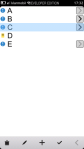
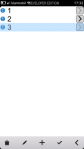
In this current implementation I disabled the swipe gesture for navigating the tree. Instead you can use the icons to the right of each element to go to the next level in the tree. Use the button at the very right in the menu bar to go back up in the tree.
If you want to use the swipe gesture for navigating the tree you can enable this feature simply by setting the “interactive:” property of the Flickable in TreeView.qml to “true”. Note that there is some strange issue at the moment when using swipes for navigating the tree. When moving back up in the tree via the swipe gesture selecting entries in the displayed list does not work correctly for a time of about 0.8 – 1 seconds.
I also changed the license for the TreeView code. The TreeView and its components are now additionally licensed under the terms of the GNU Lesser General Public License (LGPL). Please see the source code for more details on licensing and the like. I uploaded the source code as well as an installable version of my project (Q To-Do) for which I developed the TreeView initially. Please note that Q To-Do (a Qt/QML port of To-Do-O) is still in development.
Reorder Items in a QML ListView via Touch Gestures
The stock QML ListView is pretty handy for displaying simple data structures. While porting To-Do-O to Qt/QML (MeeGo/Harmattan to be more precise) I stumbled across a use case where I want to move / reorder items in a list. In my opinion the most natural way to do this on a touch UI device is to use some drag-and-drop gesture like handling for moving items. In this post I’ll describe how I implemented a simple solution for moving items in a QML ListView via touch interaction.
QML SectionScroller vs. QAbstractListModel
A SectionScroller essentially allows quick scrolling in large lists. Though, there are some pitfalls when you want to use a custom C++/Qt based model with a SectionScroller in QML. Please note that this should work with a QAbstractItemModel based model class as well as with a model class derived from QAbstractList model. Though, I didn’t test an implementation based on QAbstractItemModel yet.
Here is an example of a QML SectionScroller in action:

 ruedigergad
You must be logged in to post a comment.