Clojure Guide and Presentation

Some time ago I started to write a simple guide about the Clojure programming language. In the meantime I also added an introductory presentation. Finally, I also had the time to push everything to github: https://github.com/ruedigergad/clojure-by-example

For those who didn’t hear about Clojure yet: Clojure is a functional programming language, actually a Lisp dialect, that runs on the Java Virtual Machine. It offers many great features that enable you to write code very quickly and concisely.

All the documents are available as PDF and as LaTeX source. This work is licensed under the Creative Commons Attribution Share-alike license. Suggestions, corrections, and other feedback is always highly appreciated.

Posted in Announcements, Snippets | Tagged , , , , | Leave a comment

Update: Nexus 7 & PlasmaActive vs. 3G

Just a small update to (partly) answer my own question: apparently, the 3G modem in the Nexus 7 can be accessed via the cdc_acm Linux kernel driver. Great thanks to whoever activated that option in our hardware-adaptation kernel (I suspect Tuomas did this. :)).

To cut a long story short. After inserting my SIM card into the Nexus 7 (Note that I have disabled the PIN for this particular card.) a new “Mobile Broadband” device showed up in the network manager applet. According to the info there it is the device /dev/ttyACM0. Note that I have two ttyACMx devices here on the Nexus 7 3G version, 0 and 1. According to the modem-manager debug output the 3G modem is identified as “XMM6260”, which corresponds to the other sources that say this chip is built into the Nexus 7.

So far so good, however, there is the problem that the XMM6260 seems to use a (slightly?) different command set. Apparently ofono already has an according driver implementation for this chip but not modem-manager. I uploaded the debug output of modem-manager to pastebin: http://pastebin.com/d7wS98FU

Still, even though the modem does not work yet, it is great news that there is the kernel driver. All that is needed now to get internet via 3G working on Nexus 7 with PlasmaActive is either an adapted modem-manager or the integration of ofono.

Posted in Uncategorized | Tagged , , , | Leave a comment

Wanted: Nexus 7 3G Linux Driver?

This time I am not announcing something but want to ask a question: is there a driver for the Nexus 7 3G/UMTS/HSPA module/chip for Linux?

Here is what I could gather so far: according to some sources the WWAN chip in the Nexus 7 is an XMM6260 aka X-GOLD 626. There is a thread with more in-detail information about this chip: http://forum.xda-developers.com/showthread.php?t=1483053

Furthermore, I could find something that looks like the source code of a Linux kernel module for this chip: https://review.tizen.org/git/?p=kernel/linux-2.6.36.git;a=blob;f=drivers/misc/modem/xmm6260.c Unfortunately, it seems that this requires two additional binaries (xmm6260-boot and xmm6260-dump) which I couldn’t fine anywhere.

So, the question: is there some way we can get this chip to work (specifically on Nexus 7) with a “standard” Linux kernel/distribution?

Posted in Uncategorized | Tagged , , | 2 Comments

New Rootfs Tarball of Plasma Active for Nexus 7

A new rootfs tarball of Plasma Active for Nexus 7 is available: http://download.kde.org/unstable/active/3.0/images/nexus7/plasma-active-nexus7-testing-mer-latest-2013-01-07.tar.bz2.mirrorlist In this snapshot sound and hardware-accelerated video playback (at least for mp4 videos) should work out of the box. Note that you might need to un-mute the sound in the media player app explicitly via the volume keys.

Posted in Announcements | Tagged , , , , , | 3 Comments

Plasma Active for Nexus 7: Running the touch-optimized Plasma Active Linux Distribution on Nexus 7

We are very happy to announce the first testing release of Plasma Active for Nexus 7. Plasma Active, in a nutshell, is a Linux distribution (based on Mer as a core) that is specifically optimized for tablet computers.

Tuomas Kulve and me had been working on the Mer “hardware-adaptation” for Nexus 7 that enables to run Mer-based distributions like Plasma Active on the Nexus 7. Based on this hardware-adaptation and the work from Plasma Active we created an installable “image” that can be used to “flash” the current Plasma Active 3 on the Nexus 7.

Event though very much already works reasonably well, there are still some glitches. So, please don’t expect a 100% working system. We released this as testing version in order to get more feedback and with the hope that others may also contribute to the Mer Nexus 7 hardware-adaptation as well.

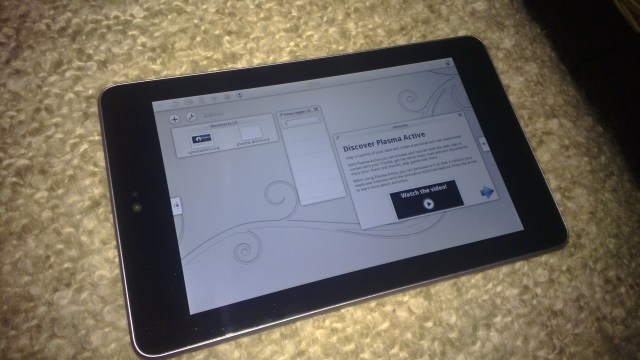
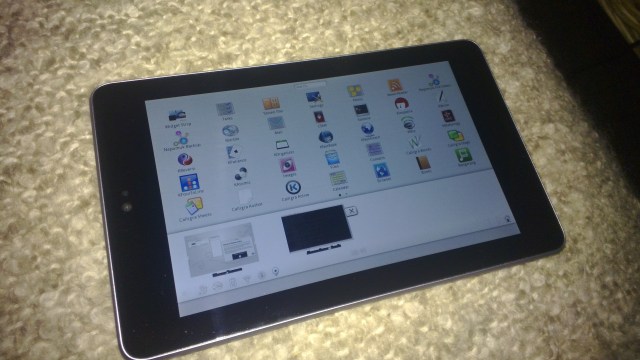
Here are two photos of Plasma Active running on the Nexus 7:

12120059 12120058

To see the installation instructions read on.

Continue reading

Posted in Announcements, Misc., Snippets | Tagged , , , , | 130 Comments

Nexus 7 MOSLO with kexec hardboot and 3G Nexus Support

In a prior post I wrote about how I got MOSLO running on Nexus 7. In this post I just want to briefly introduce that the current version of the Nexus 7 MOSLO now also supports dynamically loading kernels via kexec as well as the 3G Nexus 7.

The problem with the 3G model of the Nexus 7 is that it has a slightly different partition layout due to an additional partition that seems to be used for the 3G firmware. Basically, the userdata partition on the 3G model is on mmcblk0p10 instead of mmcblk0p9. However, userdata seems to always be the last partition. At least for those Nexus 7 models I could test this was true. The current version of Nexus 7 MOSLO (0.0.15.3) automatically handles the different Nexus 7 models by assuming that the last partition on mmcblk0 is the userdata partition.

Having support for kexec is particularly useful to enable multi-boot functionality. I had to learn that “normal” kexec seems to be broken for Nexus 7 right now. Fortunately, there is a method called “kexec hardboot” that allows to circumvent this issue.

I found some posts by Tassadar who ported kexec hardboot to Nexus 7. He also provides a direct link to a patch against the Nexus 7 kernel. Tassadar is also the author of “multirom” for Nexus 7 and LG Optimus Prime. So, if you are looking for ways how to multiboot you should also have a look there.

The current Nexus 7 MOSLO includes the kexec hardboot patches (both for the kernel and kexec-tools). So far, I could successfully load another kernel from Nexus 7 MOSLO on a Nexus 7 8GB. However, even though version 0.0.15.3 includes first support for the 3G Nexus 7 it seems that kexec is not working on this model yet.

Posted in Announcements, Snippets | Tagged , , , , | Leave a comment

Nexus 7: Easily Flash/Access Entire Userdata Partition

Recently, I got my hands on a Google Nexus 7. This is quite a nice device. But as you might have figured from my other posts I am not that much interested in using Android on it. 😉

Fortunately, it is possible to open up the bootloader and install, e.g., Ubuntu on the Nexus 7. While the possibility to install Ubuntu is already nice and a first start, my personal favorite is to have Plasma Active running on the Nexus 7.

The very first issue I encountered is how to “flash” a root filesystem onto the Nexus 7. In this post I’ll explain the problems connected with this as well as my solution to this issue based on the “MeeGo OS LOader” (MOSLO). Furthermore, this solution will enable you to conveniently mount the root filesystem like a normal USB storage device even without any installed operating system.

Continue reading

Posted in Snippets | Tagged , , , | 7 Comments

QML FlowListView

In a “normal” QML ListView, typically, all elements have the same width; essentially, the width of the ListView. I had a use case in which I wanted to be able to display multiply elements side by side as well as have the classic “full-width” elements. Moreover, in my particular use case, I wanted to have the chance to have items of arbitrary size, with maximum width being the width of the ListView.

So, neither the “normal” QML ListView nor the QML GridView were viable options. Thus, I was looking for a way on how to realize what fulfills my requirements. During this search I stumbled across the QML Tag Cloud example. The interesting point in this example, with respect to my problem, is that it shows how to combine a Repeater, a Flow element, and a Flickable in order to display more or less arbitrarily sized items based on elements of a ListModel in a pretty much freely placed flow layout.

For the QML FlowListView I also used the above combination of Flickable, Flow, and Repeater. The result is a ListView like view that can be used to display a ListModel. Selecting, adding, and removing items is also supported. Below is a screenshot of an example application.

The source code of this example and the FlowListView element is released under the terms of the LGPL. You can get both from github.

As a small appetizer: the upcoming version of Q To-Do will make use of this new FlowListView. 😉

Posted in Announcements, Qt/QML | Tagged , , | Leave a comment

N9: Dual Boot Nemo and Harmattan

I just succeeded in dual booting my N9 with Nemo and Harmattan. This is pretty cool as I can switch dynamically between Nemo and Harmattan on my day-to-day phone now. 🙂

Please note that by doing the steps below you will for sure loose the warranty for your N9. Even worse, you may destroy (brick) your device, loose data etc. The instructions are only intended for “experts” who know what they do. So, you have been warned.

The procedure to do this is very much similar as described for installing Nemo on N9 via the “Persistent Single Boot by Flashing the Dual Boot” method in the Mer Wiki; i.e., the boot loader etc. are the very same and the process of installing is very much similar. It just needs a little of additional preparation.

At first I flashed the “open mode” kernel. I am not sure if this is actually needed but well. This way it was at least easier for me to get the Harmattan kernel zImage. I downloaded the open mode kernel from here, alternatively I uploaded the kernel binary here as well.

# Flash Open Mode Kernel
./flasher -a <fiasco_image> -k zImage-2.6.32.54-dfl61-20121301 -f

Note: please be aware that there can be several problems, e.g., with existing e-mail accounts. The best approach is to delete e-mail accounts after flashing and booting the open mode kernel and re-add those.

After the open mode kernel is installed we need the kernel command line. This is needed for enabling dual boot later on. You can get the kernel command line as follows:

# Get Kernel Command Line
[root@localhost ~]# dmesg | grep -i kernel
[    0.000000] Kernel command line:  init=/sbin/preinit root=/dev/mmcblk0p2 ...
[    0.225891] 0x0000003c0000-0x0000013c0000 : "kernel"
[root@localhost ~]#

Save the line starting with “Kernel command line:” somewhere. Please note that I only show an excerpt here as this line also contains data like the IMEI etc.

After the open kernel was flashed and it was assured that it works you can go on with installing the MOSLO and installing Nemo as described in the Nemo installation guide.

After Nemo was installed and booted you can enable dual boot. In order to do this create the directory “/boot-orig” in the Nemo root. In this directory copy the zImage of the open mode kernel and name it “zImage”, add a file named “cmdline”, and put the kernel command line you saved above in the file “cmdline”. Note that you only copy the actual kernel command line without the preceding text “…Kernel command line:”. After this was done you can reboot. This time you should see some textual message informing you how to dual boot. I hope you find this useful, happy hacking. 🙂

PS: I also added information about this to the Nemo installation guide in the Mer Wiki.

Posted in Snippets | Leave a comment

clj-assorted-utils and clj-net-pcap on clojars.org

I just changed the names of my two Clojure libraries cljAcmeUtils and cljNetPcap. Those two libs are now named clj-assorted-utils and clj-net-pcap respectively.

Please excuse the inconvenience but I felt this step was necessary as I wanted to upload these libs to clojars.org. This has the unfortunate consequence that you need to change the use/require statements in case you were already using these libs. On the other hand you can now include these libs much easier in your own projects.

The new projects at github are: https://github.com/ruedigergad/clj-assorted-utils and https://github.com/ruedigergad/clj-net-pcap The projects on clojars.org are available at: https://clojars.org/clj-assorted-utils and https://clojars.org/clj-net-pcap Additionally, I uploaded the jNetPcap jar as used by clj-net-pcap with the native libs included to clojars.org as well: https://clojars.org/jnetpcap This means that you can now get the jNetPcap dependency required for clj-net-pcap much easier.

Posted in Announcements, clj-assorted-utils, clj-net-pcap, Libs. | Tagged , , , , | Leave a comment