QML TreeView

QML does not (at the time of writing) provide a component to display tree structures. There are some approaches/efforts to display tree structures http://qt-way-notes.blogspot.com  http://steveire.wordpress.com. Nonetheless I coded a TreeView on my own. The following video shows the implementation made by me that tries to provide an intuitive, quick, and easy to use TreeView for mobile devices:

In the following I’ll explain the ideas behind this implementation and the example used. The following data structure had been used for this example:

Displayed the classical way this data structure looks like (the example is an SWT TreeView in GTK):

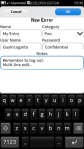
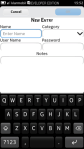
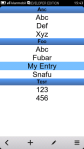
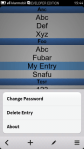
My approach on displaying this data on a mobile device is to display each level of the tree in a separate ListView. Thereby the different levels can be changed by swiping back and forth. The following pictures show the very basic ideas behind this (These pictures are provided just in case the video above did not work.):

You can download the source code of the QML TreeView as part of the current in-development code of my To-Do-O Qt/QML port To-Do-Q. Please note that this is still in a very early stage and features no functionality yet. Actually I focused my work on getting the TreeView working for now. You can also download a packaged version for MeeGo / Harmattan. The TreeView itself can be used for all QML versions from Qt 4.7 on as it relies only on “import QtQuick 1.0” (“import Qt 4.7” respectively). I only packaged a runnable version for Harmattan as this is currently my main target platform and I do not have the time right now to make this available for other targets as well. This will most probably change in the future when I make more progress in this project. It is actually quite fun to “Code once, deploy everywhere” 😉 (with the already mentioned limitations).
Posted in Qt/QML, Snippets | Tagged , , , , | 3 Comments

Share QML Code among Fremantle and Harmattan

Qt and QML are really great for writing nice and beautiful UIs and applications that can be easily deployed across different platforms and operating systems. Though, I had to discover that the slogan “Code once, deploy everywhere” is not entirely true when it comes to developing in QML for Maemo Fremantle and MeeGo / Harmattan.

The first issue is that there seems to be no usable implementation of the QML components that ship with MeeGo / Harmattan for Maemo Fremantle. I posted some of my own implementations of QML dialogs and text input for Maemo Fremantle before.

The second issue is how to share common code which, depending on the platform (Fremantle or Harmattan), uses either the above mentioned custom implementations or the stock MeeGo components. There is a proposed feature for conditional imports in QML. Nonetheless, even such a feature in an upcoming version does not solve the issues for older versions as on Fremantle.

In this post I’ll sketch how I tried to solve this issue during the development of MeePasswords in order to share as much common code as possible. Please note that I am aware that there is the qt-components package for Fremantle. Though, this package is only available in extras-devel and there seem to be some issues in using it as it is at the moment.

Continue reading

Posted in Qt/QML, Snippets | Tagged , , , , , , | 2 Comments

QML and Clipboard Interaction

Edit: Please make sure to look into the comments. While this is a rather old post, thankfully, still constructive comments are raised that point out important aspects. Unfortunately, my time does not permit to properly update the post nor did it permit me to play with Qt/QML for quite some time. So, I just refer to the comments below. Thanks a lot to the commenters.

The following snippets show how one can easily interact with the clipboard from QML code with the help of a tiny C++ wrapper / adapter. This code should work for all QML versions.

Continue reading

Posted in Qt/QML, Snippets | Tagged , , | 3 Comments

QComboBox for QML

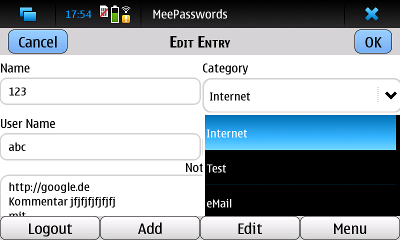
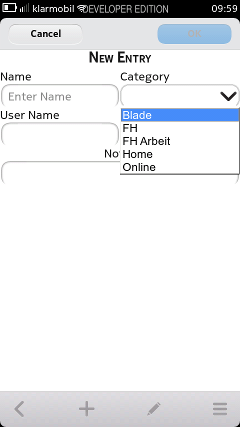
QML does not come (yet?) with the equivalent of a QComboBox. As I find a ComboBox quite useful, even for touch UIs, I wrote a simple wrapper / adapter or whatever you want to call it that enables using a QComboBox in QML. Thereby the goal was to integrate the native QComboBox Qt widget as good as possible with QML, i.e., give it the look and feel of QML and make it work with the touch UI. The following pictures show the “QML’ed” QComboBox in action in MeePasswords on Maemo Fremantle and MeeGo / Harmattan respectively.

Continue reading

Posted in Qt/QML, Snippets | Tagged , , , , , , , | 2 Comments

QML Text Input for Maemo Fremantle

Similarly to the dialogs in the previous post I also created a TextArea and TextField for Maemo Fremantle. The following picture shows the various text inputs in the Fremantle (N900) version of MeePasswords.

Continue reading

Posted in Qt/QML, Snippets | Tagged , , , , | 1 Comment

QML Dialogs for Maemo Fremantle

MeeGo / Harmattan comes with quite nice QML components like Buttons, Dialogs, and the like. Unfortunately these components are not available for Maemo Fremantle (N900). There is a qt-components package in extras-devel but there also seem to be some issues connected with this; besides, using packages from extras-devel prohibits promotion to extras-testing and extras.

Inspired by QmlComponentsButton I decided to also create some “custom” components in order to port my QML based Harmattan application (MeePasswords) to Fremantle. I started by reimplementing the simple dialog. Thereby I tried to give it the look and feel of a MeeGo / Harmattan Dialog. The following picture shows a dialog with customized content in MeePasswords on Fremantle (N900).

Continue reading

Posted in Qt/QML, Snippets | Tagged , , , , | 2 Comments

Instant Coffee for Maemo Fremantle

Instant Coffee is an effort to package Java related applications, libraries, etc. for the easy installation on Maemo Fremantle (N900). Examples of packaged applications are: OpenJDK (actually the icedtea version) [package], MicroEmulator [package], or Clojure [package]. Please note that I am not the author of those applications but only packaged those to ease the installation on the N900. Furthermore, some packages are essentially based on other existing packages e.g. from Debian and had been repackaged for the N900 to include “optification“.

The packages are created using simple shell scripts and Py2Deb or PyPackager respectively. You can find these scripts at the projects Maemo garage page: https://garage.maemo.org/projects/instant-coffee

Posted in Other Software | Tagged , , , , | Leave a comment

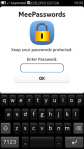
MeePasswords – Keep your passwords protected.

MeePasswords is a simple app to store confidential data like passwords etc. in a secure way. MeePasswords uses 256 bit AES CBC encryption. The UI is optimized for small touchscreen devices such as smartphones.

MeePasswords is available for Maemo Fremantle (N900) and MeeGo / Harmattan. A MeePasswords discussion thread is located at: http://talk.maemo.org/showthread.php?t=75316

The MeePasswords source code is available at the corresponding Maemo garage page: https://garage.maemo.org/projects/meepasswords

Posted in MeePasswords, My Applications | Tagged , , , , , , , , | 4 Comments

Advanced Clock Plugin

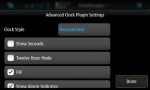
Advanced Clock Plugin is a highly customizable replacement for the stock clock of the N900. Advanced Clock Plugin comes with different clock styles and offers many settings to further customize the look of the clock.

Furthermore Advanced Clock Plugin is designed such that custom clock styles can be added as well. To add custom clock styles basic Python knowledge is required. The most straight forward approach to add a new style is to use an existing style as basis, copy it to a new file and then start hacking around. More information about Advanced Clock Plugin can be found the corresponding talk.maemo.org thread: http://talk.maemo.org/showthread.php?t=67408

The source code can be downloaded from the Maemo garage site at: https://garage.maemo.org/projects/advclockplugin

Posted in Advanced Clock Plugin, My Applications | Tagged , , , , , , | Leave a comment

SGI Wallpaper

Some day I placed all my Silicon Graphics equipment side by side and took some photographs. These wide-screen wallpaper sized pictures are some of the results of this photo session.

Creative Commons License
This work is licensed under a Creative Commons Attribution-ShareAlike 3.0 Unported License.


Posted in Misc. | Tagged , , | Leave a comment